Over the weekend, I decided to replace my aging iPhone with an Android device. People who know me, know I switch between iOS and Android every few years to keep my knowledge fresh. I also get so utterly bored with the operating system. That was the case with the iPhone 12 Pro.
And, with iOS switching to Google Gemini as backing to Siri, I figured, “Why not jump in with both feet?” I figure I can cede that part of my life (the part hosted by Google for public consumption) to the Gemini langoliers. Three apps jumped out at me as surprise recommendations, and I thought I’d highlight them. At the end, you’ll find more app suggestions and practical tips and tricks, if you need them. Read others in the Android series.
Note: I switched to a Samsung S25 Ultra with a little extra storage. Yes, yes, I know the S26 is due out in two weeks, but there’s always something newer and better coming with tech.
Replacement App Grab Bag
As I make the transition from iOS to Android, I’m trying to line up my list of replacement apps. Many of these new recommendations, I hadn’t seen before. I relied on Gemini (still waiting on the BoodleBox app…sigh) to help me identify items, but I’ll take my time installing these apps, no matter how well recommended. I dislike having a lot of apps I don’t use on my smartphone.
Setting BoodleBox website shortcut in Vivaldi:
Open Vivaldi and go to the website you want to save, then tap the Vivaldi icon (the “V” logo). Scroll down the menu and select Add to Home screen.
Note: “The BoodleBox Android app is currently in development and remains a high priority for the team. While there has not been an official release date previously, recent reports indicate that BoodleBox plans to release a mobile app with voice chat capabilities in January 2026. This suggests the Android app (and likely an iOS version) should be available around that time.” via BoodleBot chatbot. :-)
Direct Official Apps
These apps have official, high-quality Android versions. I use all of these and won’t be switching.
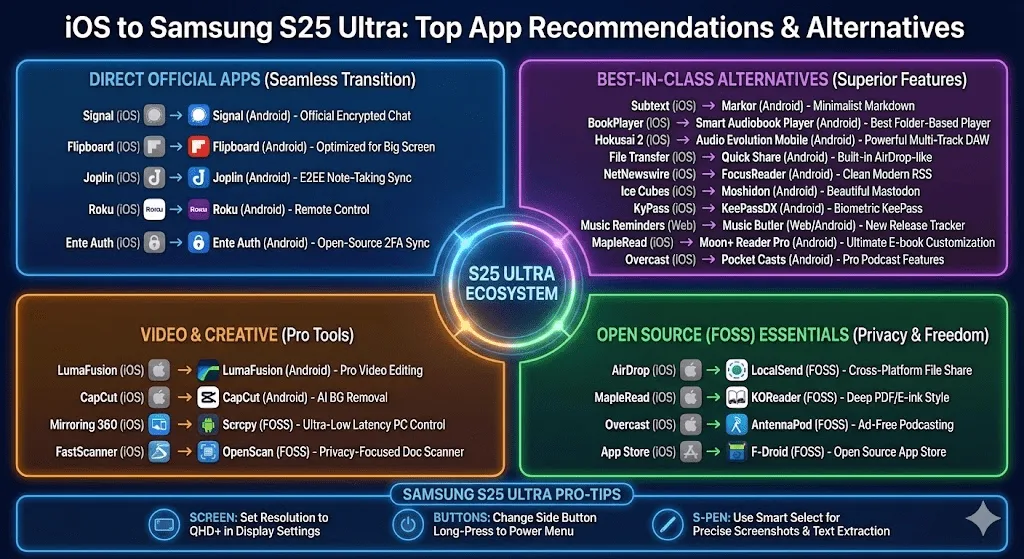
- Bitwarden Password Manager: This works great for password/passkey management.
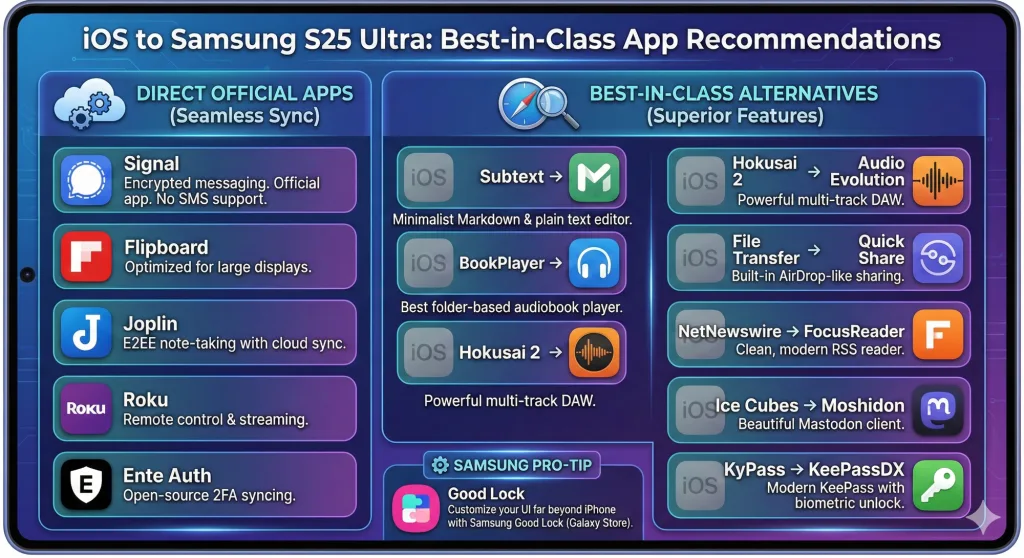
- Signal: Use the official Signal app. Note: Unlike iOS, Signal on Android can no longer handle your SMS/MMS, but it remains the gold standard for encrypted chat.
- Flipboard: Use the official Flipboard app. It is highly optimized for Samsung’s large displays.
- Joplin: Use the official Joplin app. It supports the same E2EE and sync options (Dropbox, OneDrive, etc.) as the desktop and iOS versions.
- Roku: Use the official Roku app for remote control and streaming.
- Ente Auth: Use the official Ente Auth app. It is open-source and provides seamless 2FA syncing across platforms.
Ok, that aside, let’s take a look at my top picks that really impressed me with ease of use or ability to do what I wanted.
Pick #1: FairEmail
No one recommended FairEmail to me until I asked Gemini directly for recommendations. I asked:
I am looking for an email app (free, no cost) that allows me to move email via IMAP from one account (Gmail) to another (Gmail). I thought Thunderbird app on Android would do it but no. Neither does Outlook. Any suggestions?
This is a peculiar ask for me, but I’ve been doing this forever (shuffling email from one account to another). Its response was interesting:
On Android, moving emails between separate IMAP accounts (like Gmail to Gmail) is a rare feature because most apps isolate each account’s database for security. Since you prefer free, open-source (FOSS) solutions, the best recommendation is FairEmail.
Now, it said a whole more than that, but you just need to know that FairEmail does exactly what I need. While I will probably still use Gmail as my primary email app (I mean, what would be the point of not using it given it’s an S25 Android phone), FairEmail provides a nice backup for offloading content from one account to another for archival purposes.
Pick #2: LocalSend Transfer Files
After years of wrestling with iOS, buying a few apps to make the job easier (File Transfer iOS app is a cinch, by the way), I was shocked at how EASY and SIMPLE it is now on Android. LocalSend is a must-have app for side-loading content onto your Android phone. Gemini described it accurately:
The best cross-platform AirDrop alternative (MIT License). It allows you to share files between your iPhone, S25 Ultra, and PC over Wi-Fi with no cloud involved.
Pick #3: AntennaPod
Now that podcasts are everywhere (well, I guess they always were but I wasn’t listening to them as much then as I am now), I was really hoping for an amazing podcatcher. AntennaPod fits the bill:
The gold standard of FOSS podcasting (GPL-3.0). No ads, no tracking, and uses open directories like Podcast Index.
How can you go wrong with no advertising, right? I was subscribed in no time to my favorite podcasts (see sidebar for a list of media recommendations). Since podcast subscriptions go hand in hand with articles from blogs and other places, I should also give a shout out to FocusReader, an RSS reader that is fantastic (albeit, I had to pay $7 a year for it). I’ll probably replace it eventually but it’s nice to know content curation won’t go to the dogs on the new device.
Hey, there’s a lot more to love, including Raindrop.io app, but you can find a list of alternative to iOS apps in the Android world. I admit I haven’t installed F-Droid yet, but you can find a list of my replacements below.
Overall Take
You know, I thought iPhone and Samsung would be worlds apart, but the experience is uniform. I had some stock apps I have to use and they were easily available. I do confess that the Apple Managed Subscriptions caught me in their trap with ChatGPT and Raindrop. I’ll have to let those subscriptions expire later this year before re-subscribing via their respective websites. You know, that’s one piece of advice: When you subscribe to a new service, subscribe via their website, not the app store on your smartphone. Apple is definitely locking me into their subscription management.
Best-in-Class Alternatives
These apps, as much as I enjoy them on iOS, were replaced with Android counterparts.
iOS App
Android Equivalent
Why it’s the best
Subtext
Not sure about this one, but will be giving it a try. If you have a better recommendation, please share.
BookPlayer
Smart Audiobook Player ($2.49)
The basic 30-day trial version is great right now and $2.49 is one and done purchase. Nice! Check Voice below, though. It works great, too at no cost.
Widely considered the best audiobook player on any platform. It handles folder-based libraries perfectly and has incredible playback controls.
Hokusai 2
Audio Evolution Mobile ($12)
WaveEditor ($?)
I haven’t done anything with this…I’ll have to keep looking.
This is the most powerful multi-track DAW on Android. If you want something simpler like Hokusai, try WaveEditor.
NetNewswire
FocusReader
(<$7 a year subscription and worth it!)
A clean, modern RSS reader that supports local feeds or services like Feedly/Inoreader. FeedMe is another great “pro” alternative.
Ice Cubes
Moshidon
This just works and does so quite well. Highly recommend.
A beautiful, feature-rich Mastodon client based on the Megalodon/Mastodon design language. Fedilab is the go-to for power users.
KyPass
KeePassDX
A backup tool for me, but nice to have.
A modern, “Material You” KeePass client that integrates perfectly with Android’s Autofill API and biometric unlock.
Ebooks, Audiobooks, and Podcasts
As I spend a lot of time consuming content, I was curious about which tools would work best. At the end of my iOS journey, I had finally stumbled on so wonderful iOS apps that I highly recommend for ebooks, audiobooks, and podcasts.
Here are the recommendations, but I’m still looking for a non-subscription, free, open source RSS reader:
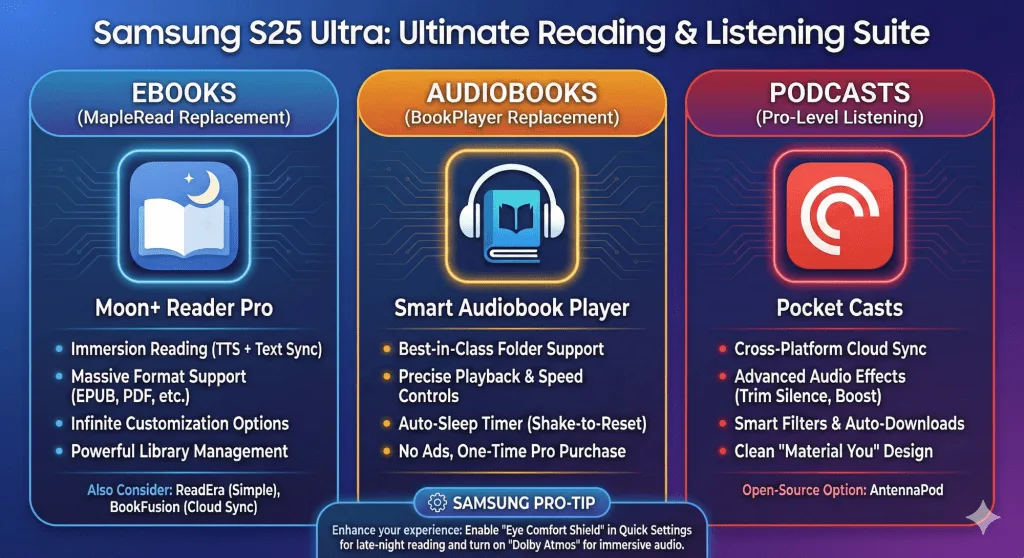
Category
iOS App
FOSS Android Alternative
Why it’s the best for FOSS purists
E-Books
ReadEra or
I went with ReadEra. Works great and I use it on my tablet.
A powerful, highly customizable document viewer (GPL-3.0). It is famous for its “reflow” feature for PDFs and deep e-ink style controls.
E-Books
This costs money but has ads. Get the Pro version ($5.99) if you really need to avoid ads.
Supports almost every format imaginable (GPL-3.0). It’s extremely fast, offline-first, and has a dedicated “Musicians Mode” for scrolling scores.
Podcasts
Fantastic.
The gold standard of FOSS podcasting (GPL-3.0). No ads, no tracking, and uses open directories like Podcast Index.
Audiobooks
I accidentally bought Smart AudioBook Player so haven’t compared Voice yet.
A minimalist, beautiful audiobook player (GPL-3.0). It focuses on simplicity, folder-based playback, and remembering your position perfectly.
File Transfer
AirDrop
This is awesome.
The best cross-platform AirDrop alternative (MIT License). It allows you to share files between your iPhone, S25 Ultra, and PC over Wi-Fi with no cloud involved.
Miscellaneous Apps
These are miscellaneous iOS apps…I’m going to probably have to weed these out over time, but it’s good to know they are there if needed. The link goes to the Android version. I found compiling this ahead of time makes them easier to install. I almost wish there was a Ninite for Android apps.
- Misc Stuff
- F-Droid: F-Droid is an installable catalogue of FOSS (Free and Open Source Software) applications for the Android platform. The client makes it easy to browse, install, and keep track of updates on your device.
- DoorDash
- Texas by Texas (TxT)
- Browser and VPN
- Content
- Amazon and Amazon Kindle
- Astro File Manager
- Canva: AI Photo and Video Editor
- Chirp Audiobooks
- Documents (OnlyOffice)
- Forj Connect (f.k.a. Mobilize)
- LibriVox Audio Books
- JetPack
- OpenScan Document Scanner
- Paranoia Works’ SSE File and Text Encryption
- Radio Garden
- Samsung Voice Recorder
- Scrcpy Android (Phone to PC Screen Mirroring and Control) and Mirroring360
- Spectrum TV
- VLC Media Player
- Health
- Travel/Lodging