

It is the fourth week of August. A new teacher catches you in the hallway and asks how many personal days she gets. Or, maybe, it’s another esoteric question that you both know is inside the District’s 60-page faculty handbook. You point her to the PDF, she opens it on her phone, scrolls for a while, and quietly gives up. The answer was there but it was impossible to find. Or worse, it was written in legalese that it would take a Human Resources director to explain it. I’ve been there. How about you?
An AI-Powered Solution
Stony Evans offers a clever fix in Ask the Handbook via Gemini Notebook. He added student and faculty handbooks to Gemini Notebook so users could ask questions in plain language and check the cited pages.I love this approach! In fact, I’ve done the same with my employer’s handbook so I can get clear answers to my poorly worded questions.
That approach works great. Of course, there may be a slight hitch. What if you haven’t rolled out Gen AI for all your teachers? Or provided training for teachers on Gemini Notebook or whatever AI tool you are deploying campus/district-wide?
It’s a trivial roadblock but it makes another option I’ve found worth considering as a detour. Let’s explore that.
A Detour Around AI-Powered Solution
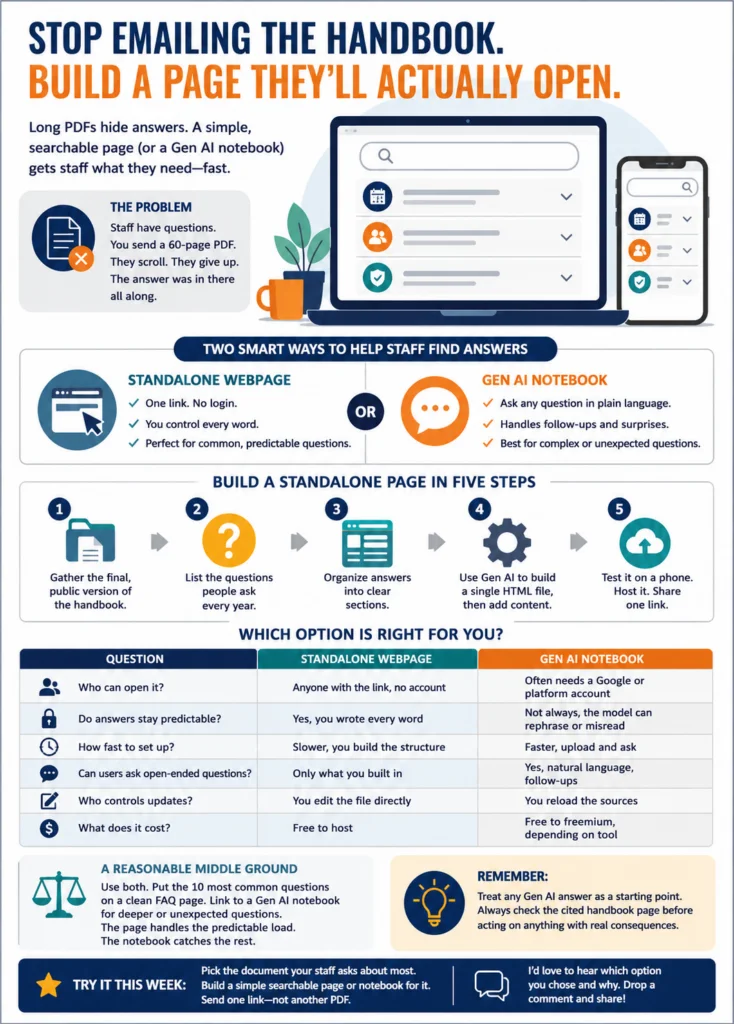
That detour option is to turn the handbook into a simple, searchable web page. You can always point a Gen AI tool to the website and ask it to dig through the webpage for questions.
Check This Out! A Sample Prompt
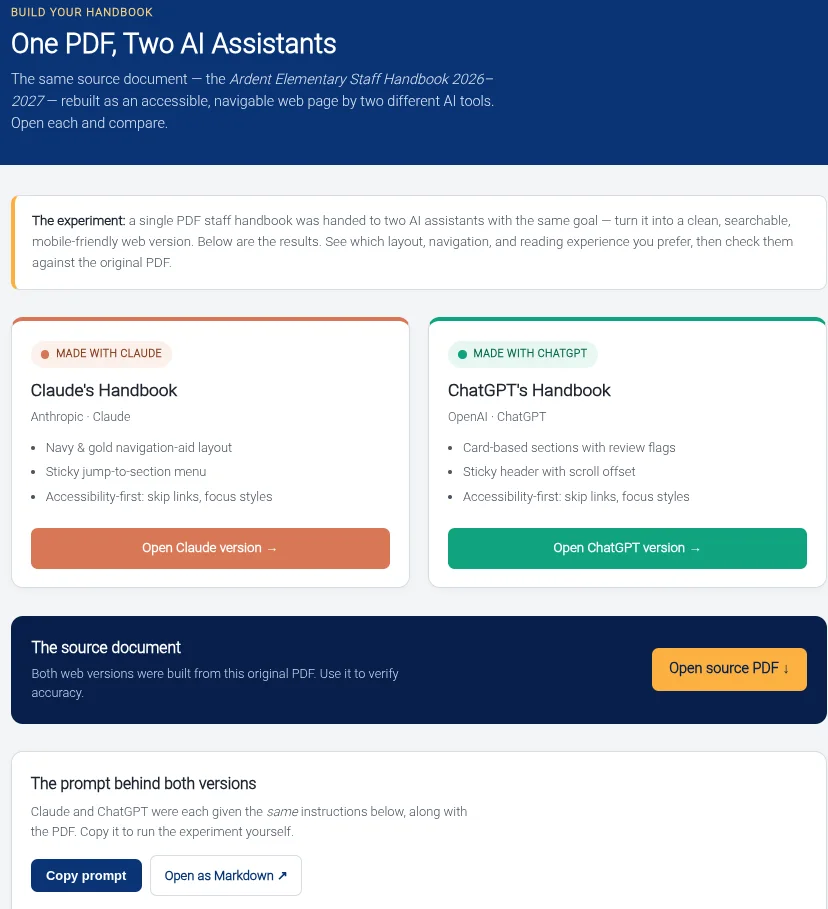
Here’s a sample prompt you can use right now. I used it on this sample staff handbook with these results prepared by ChatGPT and Claude. Everything (e.g. prompt, PDF, example results) is available on the website below.
Build What People Need
A standalone page can be one HTML file hosted on GitHub Pages, a district server, or another public website. It might include a search box, expandable sections, and answers to the questions employees ask every August. The main benefit? No account required. Did I mention a search box was included? Yes, yes, I did.
No account is required. No chatbot has to interpret the question. You control every word.
I host pages like this one on GitHub Pages because the same link works on a phone, Chromebook, or laptop. More important, I do not have to explain where someone should click inside a PDF. That alone saves a few hallway conversations.
Start with Five Steps
- Gather the final, public version of the handbook
- List the questions people repeatedly ask
- Organize the answers into clear sections
- Ask Claude, ChatGPT, or Gemini to build a single HTML file
- Test the page on a phone, then share one link
Do not ask the Gen AI tool to rewrite district policy. Paste in the approved wording yourself, especially when the answer involves leave, discipline, benefits, or employee rights.
Pick the Right Format
| Standalone webpage | Gen AI notebook |
|---|---|
| No login required | May require a platform account |
| Wording stays fixed | Answers may be rephrased |
| Questions must be anticipated | Users can ask follow-up questions |
| You edit the page directly | You update the source files |
| Takes longer to build | Faster to start |
A Gen AI notebook handles unexpected questions well. A standalone page gives you tighter control.
You do not have to choose only one. I would put the ten most common questions on a public FAQ page, then link to a notebook for the harder questions. The webpage handles the predictable traffic. The notebook catches the rest.
Any Gen AI answer should still be checked against the cited handbook page before someone acts on it. Give it a go!
Did You Know? TCEA’s AI Essentials for Educators course explores practical Gen AI use in classroom and campus work. What’s more, you earn 17 hours of CPE credit exploring a variety of Gen AI tools, including BoodleBox, ChatGPT, Claude, Gemini, as well as cover vibe-coding in the context of classroom examples.
Pick the document people ask about most. Turn it into something they can search instead of another PDF they will not read.