
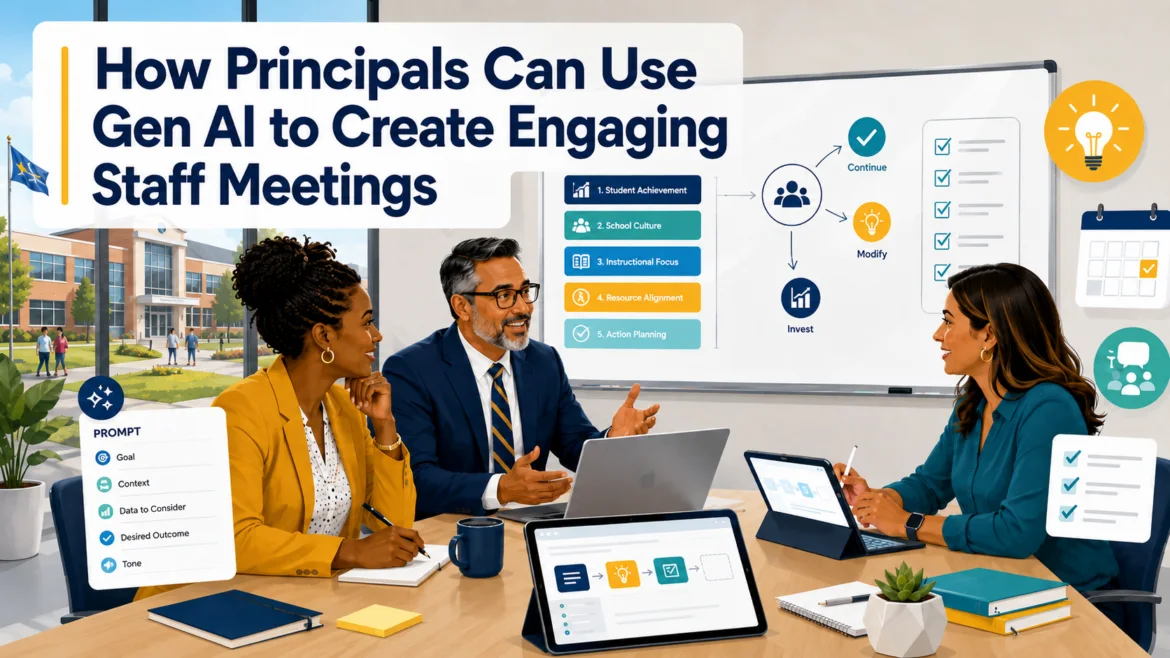
It is 3:45 PM on a Tuesday afternoon, and you are staring at a twelve-item agenda. What’s more, there are several unresolved problems, and you promised everyone that you would be done by 4:30 PM. If you haven’t been there, you will be. Worse, like I have at so many of these meetings, your staff will be wondering, “Will I be able to make it across town to pick up my kid from after-school care? Will I be able to make dinner or visit my senior citizen parents who need looking after?” The principal (pun intended) question becomes, “How do I keep staff engaged during a meeting?”
Lean On Me
You won’t be the first or the last person to lean on Gen AI tools for assistance preparing meeting elements. School leadership meetings become more engaging when participants have a clear problem to examine, a structured way to contribute, and an assigned next step. Gen AI can serve as your thinking partner to develop engaging activities. And, for goodness’ sake, avoid twelve meeting item agendas. Handle it in an email, through department or grade level meetings, one on one. The results will be more satisfying.
The eight prompts below can help you build better agendas, discussion activities, data reviews, decision checks, and follow-up notes.

What Makes a Principal Meeting Engaging?
An engaging campus leadership meeting does not require games, prizes, or an icebreaker involving childhood photographs (although those can be fun, they are becoming passé. Instead, add these four elements to your meeting:
- A clear purpose
- A question worth discussing
- A way for everyone to contribute
- A decision or action at the end
As you might imagine, Gen AI can help you prepare each part. Of course, be sure to not use it to make the final decision, evaluate employees, and/or receive confidential student and personnel information.
What’s more, before using any prompt, remove names, identification numbers, discipline details, evaluation records, medical information, and other protected data. Replace them with role labels, percentages, broad trends, or fictional examples.
Match the Gen AI Prompt to Your Meeting Goal
Here are the prompts and what you can use it to do. Take a moment to skim the list before going further. Feel free to jump ahead to the one or two that catch your eye.
| Prompt | Use it to |
|---|---|
| Agenda Rebuilder | Separate announcements from real meeting work |
| Campus Scenario | Introduce a realistic leadership problem |
| Data Detective | Examine patterns without jumping to conclusions |
| Silent Idea Sprint | Gather ideas from every participant |
| Stakeholder Check | Consider who may be affected by a decision |
| Conversation Rehearsal | Prepare for questions or disagreement |
| Decision Stress Test | Find assumptions, risks, and missing evidence |
| Action Log | Assign owners, deadlines, and follow-up |
One. Turn an Agenda into a Working Meeting
Many school meeting agendas are lists of topics rather than plans for discussion. “Attendance,” “Testing,” and “Campus culture” say what the meeting is about, but they do not tell participants what they must accomplish.
Use this prompt to rebuild the agenda around outcomes:
Review the campus leadership meeting agenda below. Classify each item as information, discussion, decision, or action. Move information-only items into a pre-meeting update. For each remaining item, identify the question participants must answer, the person responsible for guiding the item, the time limit, and the expected outcome. Return a sixty-minute agenda in a table. Flag any item that does not have a clear purpose.The resulting agenda should make it clear when the team is listening, discussing, deciding, or accepting responsibility for a task.
Two. Create a Campus Leadership Scenario
Some campuses have a noticeable chill in the air, while others are warm and welcoming. Depending on where your campus falls, people may hesitate to discuss a real campus problem when they believe the conversation could sound like criticism of a colleague. A fictional case gives the team a little distance and cover to bring up tough topics.
Create a realistic 175-word scenario for a principal and assistant principal meeting based on the campus issue below. Use fictional names and remove identifying details. Include competing priorities and enough uncertainty to support more than one reasonable response. End with four questions about evidence, possible actions, consequences, and missing information. Do not provide a recommended solution.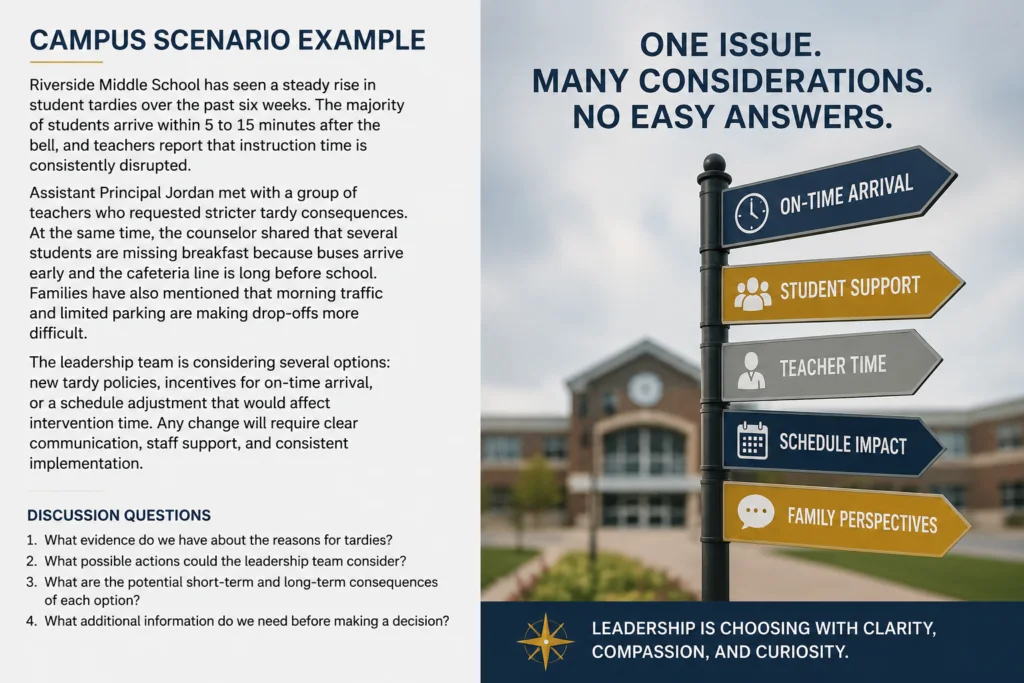
A strong scenario can open discussions about attendance, student behavior, intervention schedules, family communication, teacher support, or campus procedures. This also a great time to introduce norms, and for that, I highly recommend the Crucial Conversations text.
Three. Turn Campus Data into a Data Detective Activity
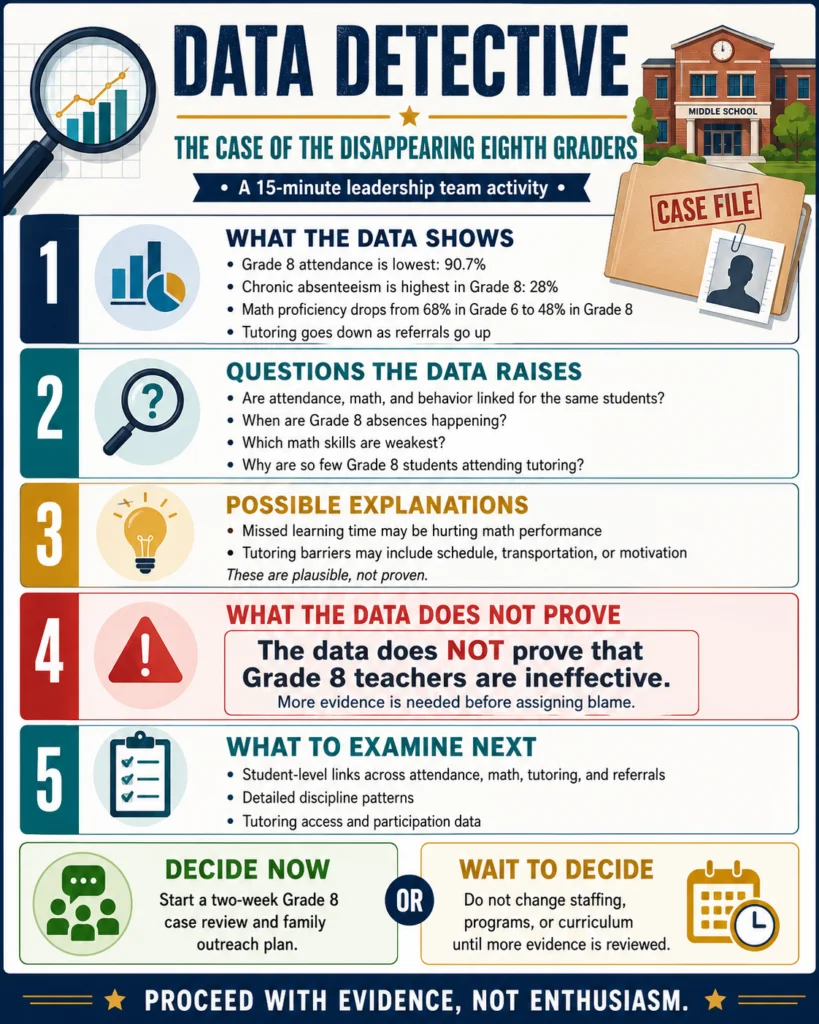
Campus teams can move from a small data point to a large conclusion with impressive speed. A structured data activity slows that process down.
Using the anonymized campus data below, create a fifteen-minute Data Detective activity for a school leadership team. Include four observations supported directly by the data, four questions the data raises, two plausible explanations that require more evidence, one conclusion the data does not support, and three additional data sources the team should examine. End with one decision the team can make now and one decision that should wait.This prompt separates what the team knows from what it suspects. That distinction matters when the discussion could affect students, staffing, schedules, or campus programs.
Did You Know?
Attend the TCEA 2027 Convention and Exposition Pre-Convention event, Turn Assessment Data Into Action. Register now.
Four. Run a Silent Idea Sprint
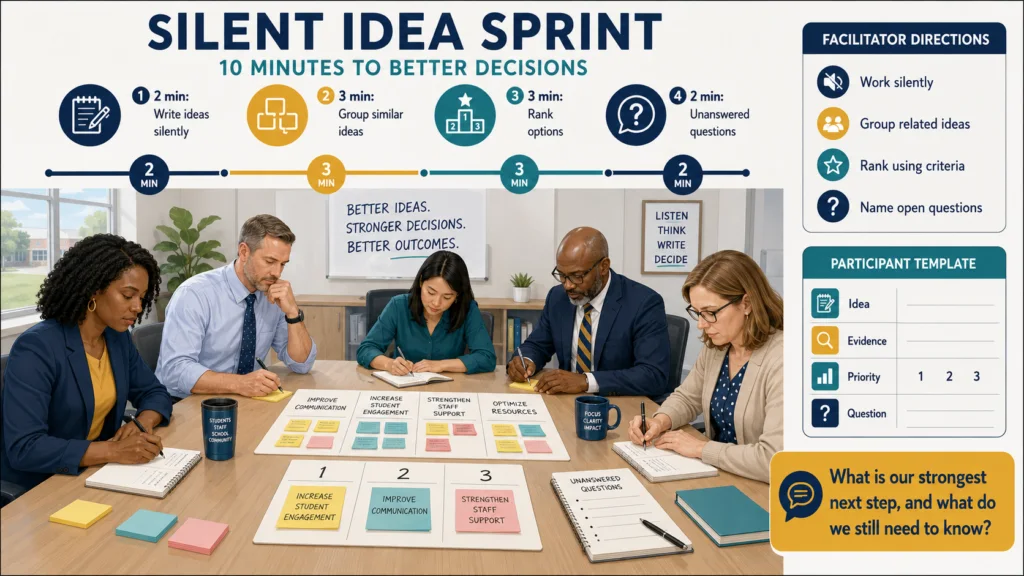
A meeting can become less useful when the first speaker frames the entire discussion. Silent writing gives each participant time to develop an idea before hearing everyone else’s.
Design a ten-minute silent idea sprint about the campus challenge below. Include two minutes for individual writing, three minutes for participants to group similar ideas, three minutes to rank options using stated criteria, and two minutes to identify unanswered questions. Provide brief facilitator directions, a participant response template, and a final reporting question.This format works well for schedule changes, family engagement, professional learning, student incentives, campus routines, and improvement planning.
I like this approach because it does not require the loudest person in the room to become the meeting’s unpaid facilitator.
Five. Examine the Decision Through Stakeholder Questions
A leadership team may agree on a proposal while overlooking questions teachers, students, families, or support staff will raise later.
Review the proposed campus decision below through the perspectives of a teacher, student, family member, counselor, office staff member, and campus administrator. For each role, generate two reasonable questions, one possible benefit, one concern, and one piece of information that person may need. Do not claim that these responses represent every person in the group. Present the results in a table.The generated responses are planning questions, not substitutes for speaking with the people affected by the decision.
Six. Rehearse a Difficult Campus Conversation
Principals and assistant principals often know what they want to say. The harder part is anticipating how the message may sound to someone who disagrees.
Act as a professional but skeptical staff member responding to the campus decision below. Ask me one challenging question at a time. After each answer, identify what was clear, what sounded vague or defensive, and what evidence or example would improve the response. Continue for five rounds. Finish with a list of the three questions I should prepare for before the meeting.This rehearsal can help with changes involving schedules, supervision, grading expectations, instructional priorities, student behavior, or required procedures.
Seven. Stress-Test a Campus Decision
Some meeting decisions are easy to change. Others can affect budgets, staffing, schedules, and trust for months.
Stress-test the proposed campus decision below. Identify the evidence supporting it, assumptions being made, groups affected, possible unintended consequences, implementation barriers, and early warning signs. Classify the decision as easy to reverse, difficult to reverse, or effectively permanent. Generate five questions the leadership team should answer before approving it. Do not make the decision for the team.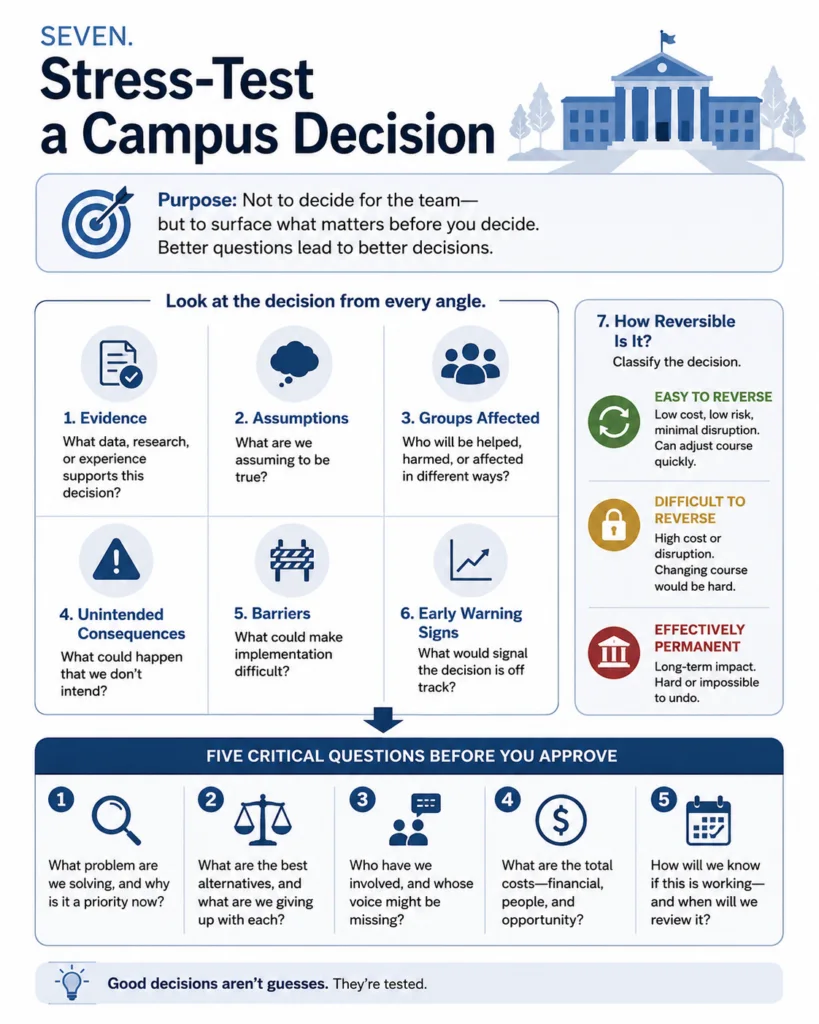
The prompt does not tell leaders what to choose. It helps them notice what they may have missed.
Eight. End with an Action and Decision Log
A productive discussion can still disappear by the next morning when no one records the decision or assigns the work.
Convert the meeting notes below into an action and decision log. Include the decision made, action required, owner, deadline, first visible sign of progress, follow-up date, and unresolved question. Flag every task that lacks an owner or deadline. Then draft a staff follow-up message of no more than 150 words. Do not add decisions or commitments that do not appear in the notes.Review the output before sharing it. Gen AI may misunderstand informal notes, speaker labels, abbreviations, or unfinished discussions.
A Reusable Prompt Formula for Principal Meetings
You can adapt the prompts above using this basic structure:
Act as a school leadership meeting planner. Help a principal and assistant principal team address [specific campus issue]. The meeting includes [participants] and lasts [time]. Create [activity or output]. Include [required elements]. Exclude [confidential information, unwanted content, or actions]. Return the result as [table, agenda, discussion guide, or action log]. Before finishing, identify any missing information or assumptions that require human review.The specific details make the prompt more useful. Include the meeting length, participants, desired outcome, and limits whenever possible.
Did You Know? TCEA’s AI Essentials for Educators is a seventeen-hour, self-paced online course covering stronger prompts, role personalization, collaboration, research with citations, privacy, ChatGPT, Claude AI, Gemini, NotebookLM, BoodleBox, Perplexity, local AI, and vibe coding.
Flip the Script Toolkit
Explore the answers to six questions about Gen AI to get action-oriented and engaging meetings going.
Start with the Meeting Already on Your Calendar
Choose one recurring meeting. Remove one announcement that could be shared in advance, select one prompt from this list, and define the decision or action the team should reach before leaving.
Afterward, ask three questions:
-
Did more people contribute?
-
Did the team address the real issue?
-
Does everyone know what happens next?
Those answers will tell you more about meeting quality. Of these, my favorite is “Did more people contribute?” When the room is silent, you know you are on thin ice as a leader.
Which prompt could improve your next campus leadership meeting?