
“Where do we even start with GenAI implementation? How do we balance using new technologies in schools with safety?” The first question comes from a teacher interested in launching GenAI at her school. The second from the old Ed Tech days. GenAI tools are finding their way into every nook and cranny of school life. Forces beyond the control of school administrators and teachers are pushing GenAI into everything. If you have found yourself wondering how to implement GenAI, you are not alone. Many struggle with where to begin. Without a plan, GenAI becomes a technology inserted into teaching, learning, and leading without thought to the consequences. Educators must create and establish a framework that supports teachers while protecting students.
What’s the first step? Create your AI Leadership team. It could simply be your campus or district technology steering committee, if you still have one.
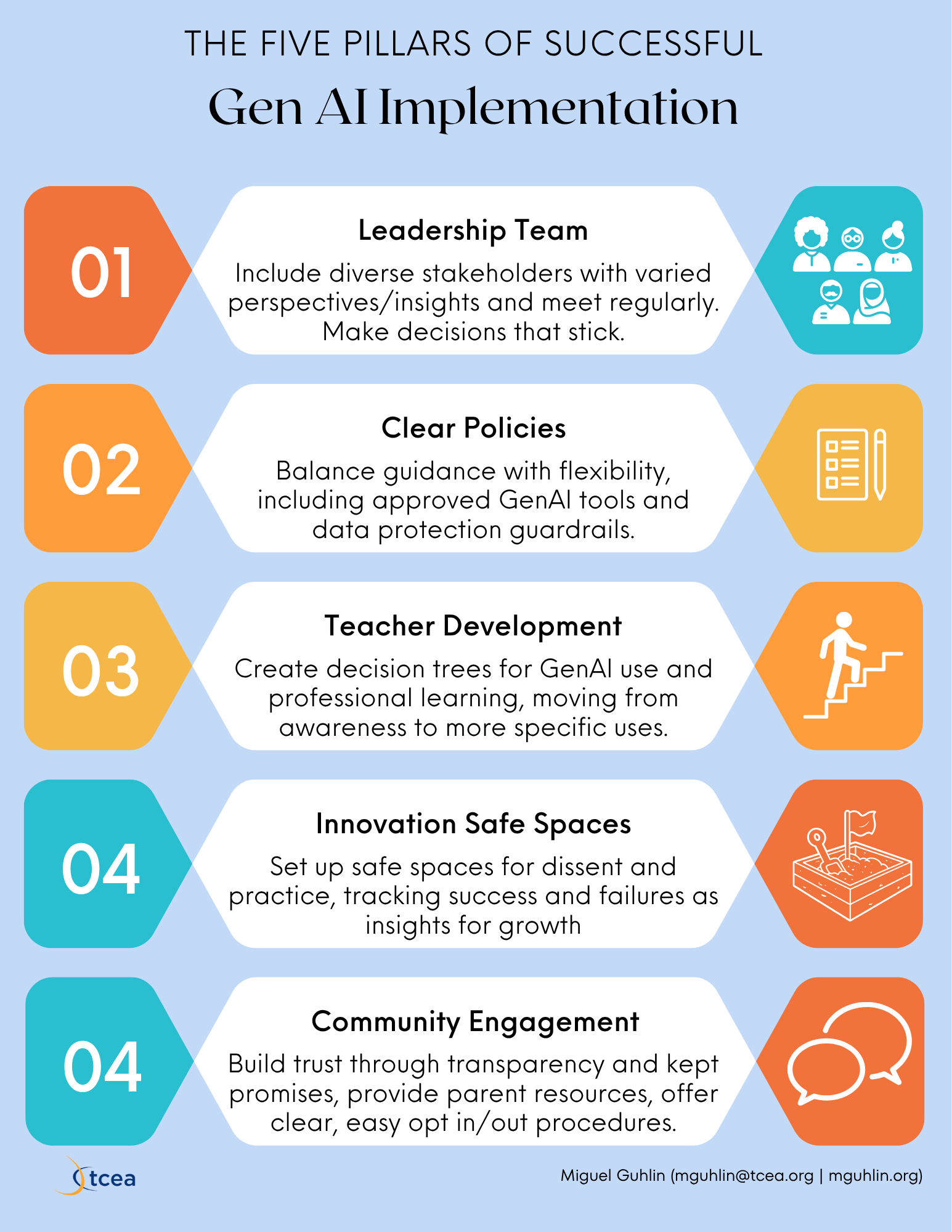
Step 1: Create Your AI Leadership Team
The foundation of any successful AI initiative is a diverse, representative team. This isn’t just about checking boxes, it’s about bringing together people with different perspectives and experiences. That way, you can anticipate together what problems will arise and plan a solution before they derail teaching, learning, and leading.
Your steering committee should include:
- Curriculum specialists who understand pedagogical implications
- IT professionals who can evaluate technical requirements
- Teachers from various grade levels who will use the tools daily
- Student representatives (for secondary schools) who bring user perspective
- Parent representatives who voice community concerns
- Data privacy officers who ensure compliance with regulations
This team shouldn’t just exist on paper. While I sympathize with large school districts (or every other size) that are afraid to have stakeholders involved for fear of disagreement and conflict, that’s the job. Schedule regular meetings with clear agendas and decision-making authority. One principal I worked with created a monthly “Show-n-Tell Hour” where her team reviewed how everything was progressing (or not). As you might imagine, it’s the lack of progress that teaches you how to move forward.
Step 2: Develop Clear, Practical AI Policies
Effective guardrails and policies offer balance. When people know what they can do, what they shouldn’t do, and are held accountable or celebrated for that adherence, it establishes a culture of trust. I would showcase any positive uses in a video archive on a website, school blog, wiki, or social media tool popular with the community.
Some core components and key elements to consider include the following:
| Policy Component | Key Elements | Implementation Tips |
|---|---|---|
| Approved Tools List | Vetted AI platforms with educational privacy agreements | Update often; include specific use cases for each tool |
| Data Protection Guidelines | Protocols for student data handling when using AI | Create simple decision trees for all to follow |
| Ethical Use Framework | Clear distinctions between appropriate and inappropriate AI applications | Provide concrete examples relevant to different subject areas |
| Evaluation Criteria | Standards for assessing new AI tools before adoption | Develop a simple rubric teachers can use independently |
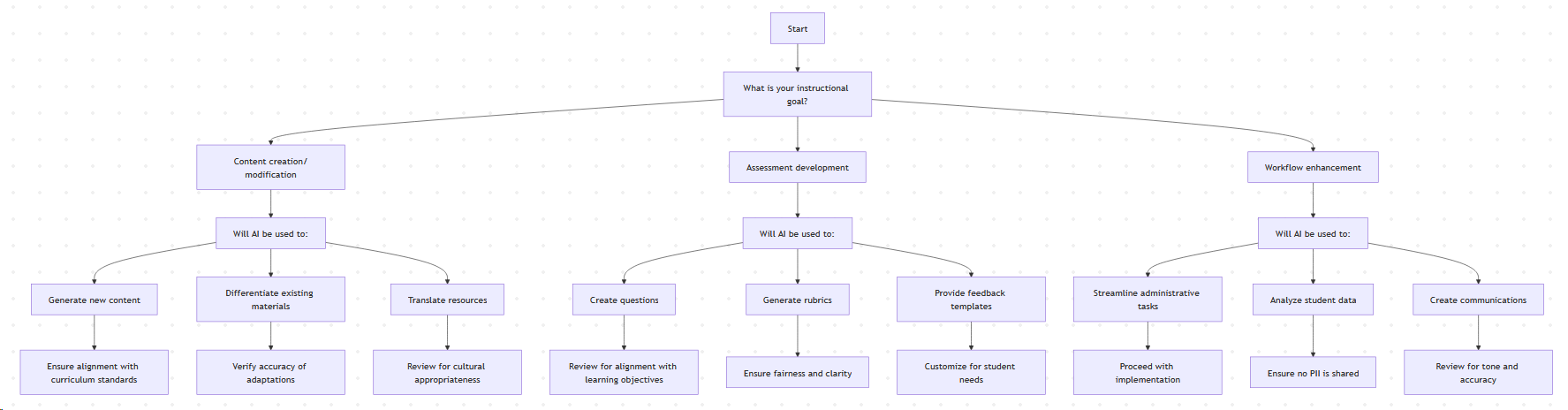
Explore these decision trees for teachers, school leaders, and students. Rather than take these and run, ask yourself, “How could we create decision trees that reflect our culture, our values, our situation?” Here’s one example (Tip: Copy-and-paste this tree into GenAI and ask your favorite chatbot to turn it into a mermaid syntax diagram, then paste the code into the Mermaid.live website to get the diagram rendered):
Decision Tree 3: Managing Student AI Use
Start → Is the assignment designed to:
├── Develop foundational skills → AI should be:
│     ├── Prohibited → Clearly state in assignment instructions
│     └── Limited → Specify exactly how AI can/cannot be used
├── Demonstrate critical thinking → AI could be:
│     ├── Used as a research tool → Require citation of AI use
│     ├── Used for brainstorming → Require explanation of process
│     └── Used for feedback → Require reflection on AI suggestions
└── Create a product/project → AI could be:
      ├── Used as a collaboration tool → Define human contribution requirements
      ├── Used for enhancement → Specify which elements must be original
      └── Used for technical assistance → Require documentation of AI assistance
Remember that policies should evolve as technology changes. One district technology director I know schedules policy reviews every semester to ensure guidelines remain relevant.
Step 3: Build Teacher Capacity Through Targeted Professional Development
You may have already figured out that professional learning on GenAI can be overwhelming in one or two inservices. You can’t change the foundation of how you work overnight. As such, you need to create a learning pathway (a fancy term for scaffolded support for teachers, librarians, administrators, and students). The purpose is to build support over time.
Some steps to take:
Start with the basics
- What is AI and how does it work in educational contexts?
- How to distinguish between consumer and education-specific AI tools
- Basic ethical considerations when using AI with students
Move to practical applications
- Subject-specific AI integration strategies
- Creating AI-enhanced (not replaced) learning experiences
- Developing student AI literacy alongside content knowledge
Specific implementations
- Designing AI-powered differentiation strategies
- Using AI to enhance assessment practices
- Mentoring colleagues in effective AI integration
Incorporating GenAI into your school’s micro-credentialing system may be helpful, as well. Avoid getting caught up in “free GenAI tool” madness that results in cycling through many tools. As a steering committee, make a commitment to a particular platform or set of platforms that address the needs you have identified.
Step 4: Make It Safe
One of my favorite terms from the “Crucial Conversations” series of books, podcasts, and videos is “make it safe.” I’m sensitive to it because I’ve seen how some top-down leaders act on their feelings of insecurity and being threatened by pushback. They often try to “smooth over the rough spots, push down hard on the bumps.” But as a colleague and friend reminded me, “A major reason capable people fail to advance is that they don’t work well with their colleagues” (Lee Iacocca). If you want GenAI to be more than the latest fun tool to make beautiful images and media, people need to feel safe about using it and critiquing its use. Some ways to do that may include:
- AI Exploration Labs where teachers can test tools with fake data (to avoid violating FERPA)
- Pilot Programs with clear metrics and evaluation criteria
- Peer Observation Networks where teachers share successful strategies (have a pineapple chart with that)
- Celebration Sites that capture both successes and challenges (create a Google Sites with what worked, what did not, and when)
Make sharing of what is happening, even when it doesn’t work, a positive. For example, in using a particular chatbot, I’ve had two people ask, “Can I save this chat easily in my space?” That’s certainly feedback to pass on to the chatbot developer. We need that kind of transparency with teaching strategies enhanced with GenAI.
Step 5: Engaging Your Community
“Trust is the residue of promises kept.” It’s one of my favorite unsourced quotes. The reason is that, in addition to promises kept, the more transparency you have, the more likely you are to have trust. Make a communication plan that keeps stakeholders informed and involved. My favorite update is the email, but there’s no reason why you can’t turn that formatted email with headers and discrete paragraphs into a TikTok-style video. Remember to meet people where they are and in a format that’s useful to them. But balance the digital with face-to-face, human connections.
Some ways to do that include:
- Parent Information Sessions that demonstrate AI tools in action
- Student Voice Committees that provide feedback on AI implementation
- Regular Updates through newsletters, websites, and social media
- Clear Opt-In/Opt-Out Procedures that respect family preferences
Maybe consider putting a “GenAI in Education” portal on your website. This enables parents to see examples of AI use in classrooms, review policies, and access resources for supporting digital literacy at home. If you’re thinking, “This isn’t new,” you are right. Documenting success is a well-trod path. In time, GenAI in Education will become like other initiatives, a part of the wallpaper. Your job is to make it progressively unnecessary as it becomes a part of what everyone does. Remember to identify your metrics and track them from the start, as much as is reasonable. You can rely on the data accrued to make improvements, drop unproductive routes and tools, and get better.
Bringing It All Together with ALDO
The TCEA Amazing Lesson Design Outline (ALDO) framework is one way to frame GenAI implementations. Since I created it, I’m not afraid to be critical of it, too. The key ideas behind ALDO focus on building relationships, pre-assessment, strategy selection, post-assessment, and reflection. Any major initiative should include these components. Here’s how it might look:
- Build Relationships: Create your diverse AI leadership team and establish community trust (TCEA’s AI in Education Journey can get you on the path).
- Pre-Assess: Evaluate your current technology infrastructure and teacher readiness (a TCEA Technology Audit is one approach).
- Select Strategies: Develop policies and professional development based on your assessment (TCEA online courses and certifications have a lot to offer).
- Implement and Assess: Launch pilot programs and measure their effectiveness.
- Reflect and Adjust: Use data to refine your approach and scale successful strategies.
Remember, TCEA has a lot to offer you. But you have to start down the path. It is the best way to maintain agency and establish your voice. Think of it as charting your course, setting your sails to move in the direction best for you.
Resources for School Leaders
- Shadow AI in Schools (Part 1 of this series)
- TCEA Essential Learning Expectations for AI in Education
- AI in Education Toolkit
- PRISM Framework for AI Evaluation
- TCEA AI in Education Journey Support
- Technology Audit: Planning for Growth
Conclusion
As exciting as any new Ed Tech solution, including GenAI, may be, its use in schools can’t be only about the technology. There has to be a process of creating an ecosystem that protects the privacy of the people in that system, and enables them to do things they couldn’t do before. We have to build a strong leadership team that can craft clear policies and invest in building teacher capacity. More important, that leadership must make it safe for everyone to learn, to teach, and grow in a transparent way. If implementing technology like GenAI is a journey, not a destination, you must plan for that journey and be ready for the unexpected. If you can’t or won’t do that, and you fail to build trust and safety, then your first step may be a stumble.