

In the ever-evolving world of technology, having a robust and comprehensive plan is crucial for organizations of all sizes. But how can you ensure your technology plans are up to par? Enter the AI-Powered Plans Analyzer, a cutting-edge tool designed to revolutionize the way we assess and improve our technology strategies. While it can’t dig a trench, run fiber, set up a printer, it can save you time so you can do that.
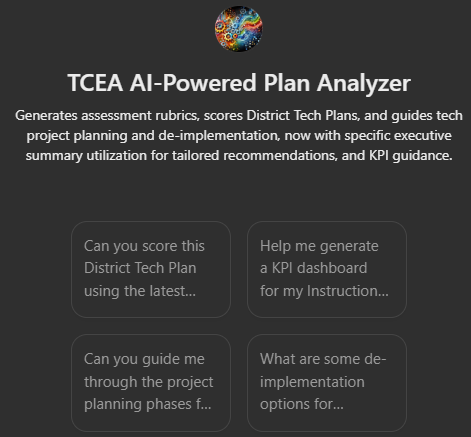
What is the AI-Powered Plans Analyzer?
The AI-Powered Plans Analyzer is designed to provide:
- in-depth assessments of various technology-related plans and strategies,
- offer valuable insights, key performance indicators, service-level agreements,
- make recommendations for improvement.
Here are some of the rubrics you can use to assess (and score) your plans, or generate upon request for offline analysis. What’s more, you can print them in a variety of formats, including PDF, markdown, Google Docs, MS Word, etc.
What Problems Does It Solve?
If you’re wondering, what problems does this solution solve, well, quite a few!
| Problem | Solution |
|---|---|
| Inconsistent Assessment of Technology Plans | Generates standardized assessment rubrics to evaluate District Technology Plans aligned to criteria |
| Lack of Expertise in Cybersecurity and Incident Response | Detailed analysis and scoring of plans, including cyber, incident response, and disaster recovery |
| Visualizing Complex Network Maps | Create visual representations of network maps and diagrams |
| Too Much Data in Tech Support Metrics | Assess metrics and offers feedback |
| Managing Ed Tech Deployments | Evaluates Ed Tech deployments |
| Inefficient Project Planning and Execution | Offers Project Management Support |
| Time-Consuming Documentation and Content Creation | Output Rubrics and Assessments in various formats |
You now have an idea of what Analyzer can do. Let’s take a look at the rubrics powering the Analyzer.
Comprehensive Assessment Rubrics
Diverse assessment rubrics, each tailored to evaluate specific aspects of technology planning, are available. Let’s take a look at a few of them.
- Cybersecurity Plan Assessment. This rubric evaluates the effectiveness and comprehensiveness of your cybersecurity strategies. It aligns it with the NIST Cybersecurity Framework (CSF) and other relevant regulations.
- Cybersafety Plan Assessment. This rubric focuses on user education, content filtering, and privacy protection. It aligns to important regulations like CIPA and FERPA.
- Network Map Assessment. This tool evaluates the clarity, security, and scalability of your network maps. It ensures your infrastructure documentation is up to standard.
- K-12 School District Technology Plan Assessment. This rubric assesses technology plans against state education technology standards and E-Rate program requirements.
- Helpdesk and Technology Support Assessment. This rubric evaluates the efficiency and quality of your IT support services. The goal is to help you optimize your technology assistance strategies.
- Equipment Replacement Plan Assessment. Stay ahead of technological obsolescence with this rubric. It focuses on maintaining and upgrading technology infrastructure.
- Disaster Recovery and Business Continuity Plan Assessment. Ensure your organization is prepared for the unexpected with this rubric. It evaluates the effectiveness of your disaster recovery and business continuity plans.
Access all the rubrics online via this document. Remember, you can customize them via the prompts you use; sample prompts are available to get you started. You will also find additional tools available based on infographics.
Project Management Action Phases
One of my favorite assignments for candidates for the IT/Tech Director certification has been to have them plan a project. They often rely on a tool like the one below:
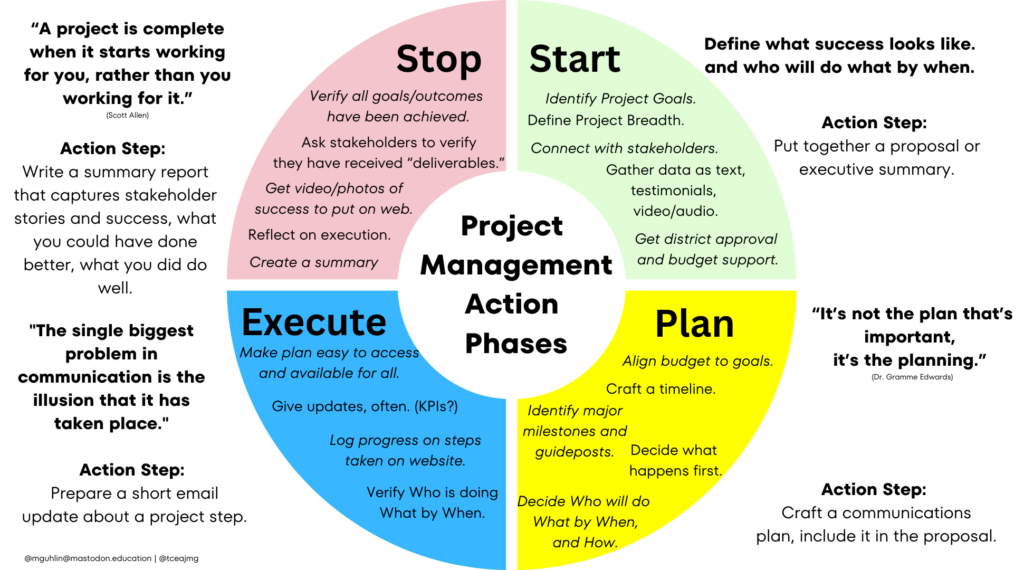
Now, you can ask the AI-Powered Plan Analyzer to generate the various components reflected in the action steps.For example:
| Phase | Action | Example |
|---|---|---|
| Start | Define the project scope, objectives, and key stakeholders. | Objective: Deploy 50 wireless access points (WAPs) across the campus to enhance network coverage and performance. |
| Plan | Develop a detailed project plan, including a timeline, resource allocation, and risk assessment. | Task: Schedule site surveys and allocate team members for each building, ensuring equipment availability and addressing potential interference issues. |
| Execute | Implement the project plan by installing and configuring the wireless access points. | Action: Deploy WAPs in Building A and B in the first week, conducting tests to verify signal strength and coverage before moving to the next buildings. |
| Stop | Review the project outcomes, close out any remaining tasks, and document lessons learned. | Task: Conduct a final inspection of the deployment, gather feedback from IT staff, and document any challenges encountered for future reference. |
This can be translated into a Gantt chart easily, one that you can adapt and use right away.
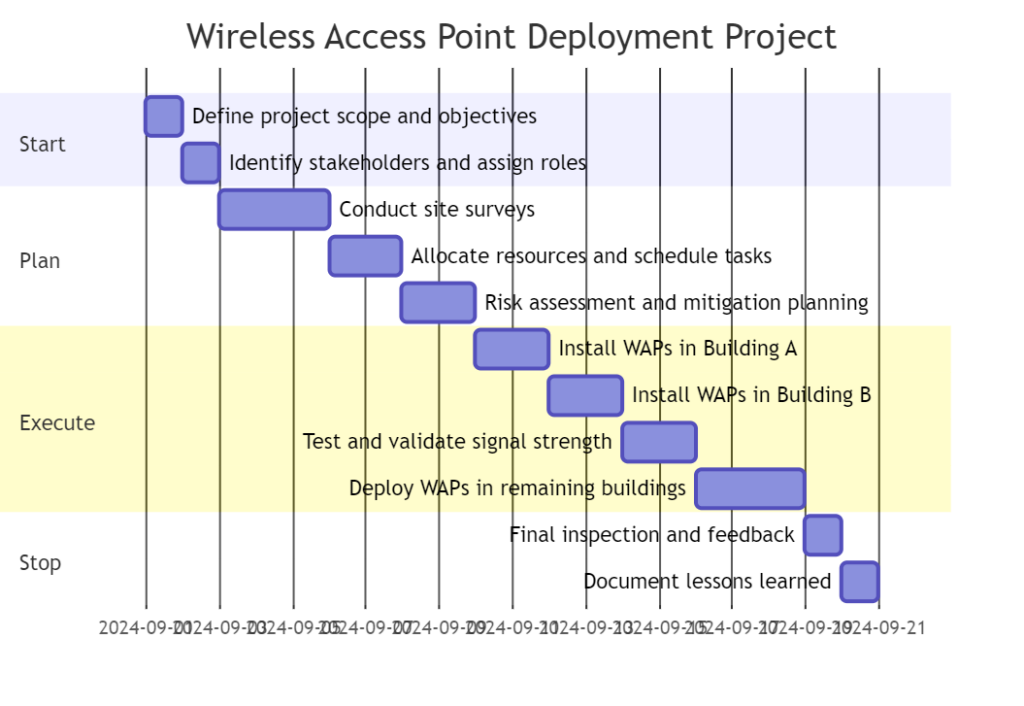
Give it a spin.
Alignment with Industry Standards
One of the key strengths of the AI-Powered Plans Analyzer is its alignment with various state and federal standards. Whether it’s the NIST Cybersecurity Framework, ITIL best practices, or FEMA guidelines, these rubrics ensure your plans not only meet your organizational needs but also comply with relevant regulations and industry standards.
Let’s take a closer look under the hood of the Analyzer and see how it aligns to various standards and guidelines.
CyberSecurity Focused
| Document/Resource | Related Standards/Guidelines | Alignment Notes |
|---|---|---|
| K-12 Cybersecurity Implementation Guide | Texas K-12 Cybersecurity Framework, National Institute of Standards and Technology (NIST) CSF | Aligns with guidelines for implementing impactful cybersecurity measures in schools, addressing state and national standards for cybersecurity. |
| Implementing Most Impactful Security Measures | NIST Cybersecurity Framework, Texas Cybersecurity Framework | Provides recommendations aligned with recognized cybersecurity frameworks, ensuring that schools adopt effective and compliant security measures. |
| Texas K-12 Cybersecurity Initiative | Texas Department of Information Resources (DIR) | Adheres to state directives on cybersecurity initiatives tailored to the K-12 environment. |
| Guide to Cybersecurity Risk Assessment | NIST Risk Management Framework (RMF), Federal Information Security Management Act (FISMA) | Guides risk assessment processes in accordance with national and federal risk management standards for cybersecurity. |
| Cyber Insurance Standards | Cybersecurity & Infrastructure Security Agency (CISA) Guidelines | Provides insurance guidelines consistent with CISA’s recommendations for managing cyber risks in K-12 environments. |
| National Cybersecurity Review (NCSR) 2024 FAQ Sheet | NCSR, DHS Cybersecurity Performance Goals | Aligns with national cybersecurity performance review standards to guide school districts in meeting cybersecurity expectations. |
| Safeguarding Sensitive Data – Encryption/Decryption Tools | Federal Information Processing Standards (FIPS) 140-2, CISA Guidelines | Provides encryption/decryption tools recommendations that adhere to federal standards for data protection. |
| Key Findings and Recommendations in K-12 | U.S. Department of Education, State Cybersecurity Laws | Highlights best practices and recommendations aligned with federal and state regulations for cybersecurity in K-12 education. |
Technical Standards and Metrics
| Document/Resource | Related Standards/Guidelines | Alignment Notes |
|---|---|---|
| Standards for Permissible Electronic Devices and Software Applications | Texas Education Agency (TEA) Guidelines | Ensures compliance with state-level requirements for electronic devices and software applications used in educational environments. |
| Technician Appraisal Checklist | Texas Educator Evaluation and Support System (T-TESS) | Evaluates technician performance using criteria consistent with state guidelines for educational staff appraisals. |
| Tech Instructional Programs Purchasing Rubric | Texas Education Code (TEC) Chapter 44, Subchapter B, National Education Technology Plan | Evaluates purchasing decisions in alignment with state procurement standards and national technology planning guidelines. |
| Technology Support Metrics | Information Technology Infrastructure Library (ITIL) | Establishes support metrics that align with ITIL standards, ensuring efficient and standardized technology support in educational settings. |
TCEA Project Management Action Phases and Supporting Documents
| Document/Resource | Purpose | Alignment Notes |
|---|---|---|
| TCEA Project Management Action Phases Infographic | Guides users through the project management phases: Start, Plan, Execute, Stop | Aligns with PMBOK (Project Management Body of Knowledge) standards, providing structured guidance for managing tech-related projects. |
| De-Implementation Options Infographic | Offers strategies for de-implementation processes | Supports strategic project management by guiding the discontinuation or re-engineering of ineffective practices. |
| TCEA Equipment Replacement Plan Assessment Rubric | Assesses equipment replacement plans | Aligns with asset management best practices and TEC standards, ensuring strategic planning and budgeting for technology lifecycle. |
| TCEA Key Performance Indicators (KPI) Guidelines | Suggests actionable KPIs for various technology areas | Aligns with ITIL and strategic management practices, providing metrics for evaluating and improving technology operations. |
| Executive Summary Utilization Guide | Guides in creating tailored recommendations based on executive summaries | Aligns with strategic planning guidelines by ensuring that project recommendations are grounded in thorough analysis and context. |
What’s more, the Analyzer gets new update from time to time to reflect the changing realities of technology planning.
Why Use the AI-Powered Plans Analyzer?
Want more reasons to use it? Here is a quick wrap up of what it can do:
- Comprehensive Evaluation. Get a holistic assessment of your technology plans across multiple domains.
- Standards Compliance. Ensure your strategies align with important industry standards and regulations.
- Actionable Insights. Receive valuable feedback to improve and refine your technology plans.
- Time-Saving. Streamline the assessment process with this efficient, AI-powered tool.
- Versatility. The analyzer has rubrics tailored to your needs.
To use it, follow these simple steps:
- Upload your district technology plan, cybersecurity plan
- Ask the Analyzer to assess it and
- Ask it to give it a score with suggestions for improvement
- Review changes then make them if appropriate
That is all. Easy, right?
The AI-Powered Plan Analyzer
The Analyzer is a powerful tool for school tech planning. It’s not just for assessment. It’s your planning assistant. It uses clear guides and follows industry rules. This makes planning faster and better. As a tech director, I wish I had enjoyed access to it. Use it to make complex planning tasks, simpler and easier.