
Supervising a web developer in a school district can be fun. Your idea starts out as a simple website, but then, pretty soon, the web developer is making suggestions about accessibility you hadn’t even thought of. If you haven’t been listening to your web developer, then you may want to. There’s a clock ticking and an upcoming deadline. This blog covers digital accessibility (A11Y for short) and offers some suggestions to prepare, if you haven’t already. You will get access to several tools and questions to ask, chatbot custom instructions, and see a sample report.
Questions to Ask
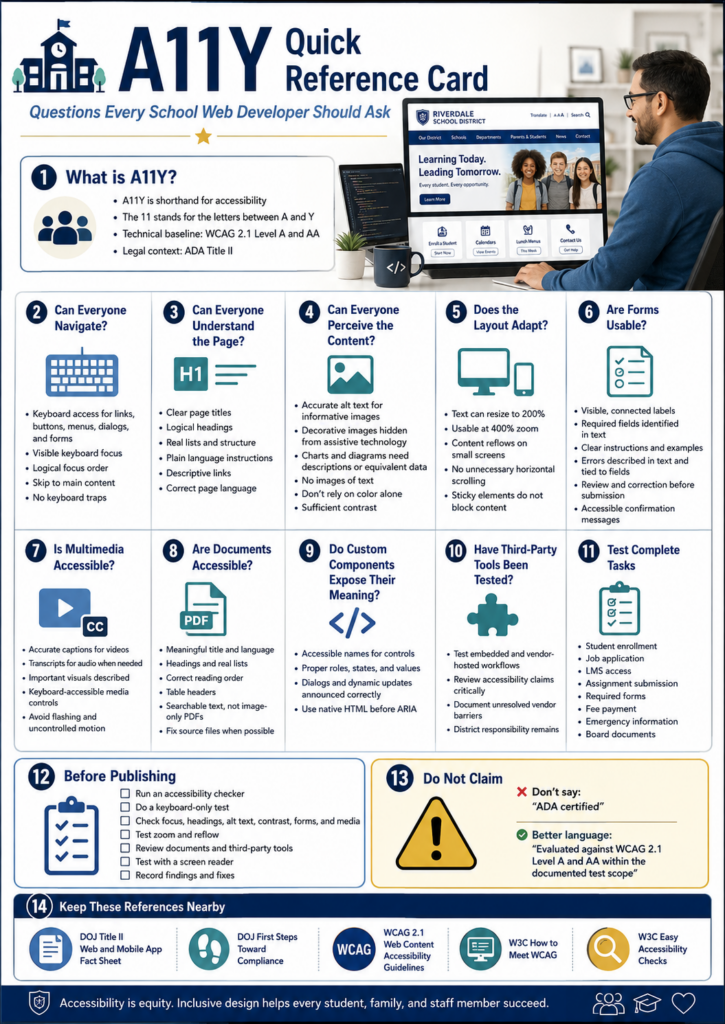
Here are some questions that you, as a web developer, should be asking. Or, maybe you should ask your web developer where your website stands on these:
Scenario To Avoid
Imagine yourself as a parent. A parent opens your district website to register a child for school. The registration link just says “Click here,” the form fields carry no labels a screen reader can announce, and the required handbook turns out to be an image-only PDF with no readable text behind it. For most families that adds up to a minor annoyance. For a parent who navigates by screen reader, it can stop the whole process before it starts.
School websites stopped being brochures a long time ago. Families lean on them to do all sorts of things, such as:
- register students,
- check calendars,
- apply for jobs,
- read emergency notices,
- make payments, and
- reach learning resources.
Once the site becomes the front door to a public service, accessibility is no longer a design nicety. A federal standard that says that in plain terms.
What Changed Under ADA Title II?
The U.S. Department of Justice updated the regulations for Title II of the Americans with Disabilities Act. Under the rule, state and local governments, public schools and districts included, have to make their web content and mobile apps accessible.
The technical standard is Web Content Accessibility Guidelines 2.1, Level AA, usually shortened to WCAG 2.1 AA. You will also run across accessibility written as A11Y, where the number stands in for the eleven letters between the “A” and the “Y.”
The rule reaches well past your homepage. It can cover items that will soon have you asking third-party solution providers how their products comply. Here’s a short list and a list of questions for those solution providers:
- Campus and department websites
- Parent and student portals
- Online registration and application systems
- Learning management systems
- Digital forms and surveys
- PDFs and downloadable documents
- Videos and recorded webinars
- Mobile apps
- Vendor-hosted services used to deliver district programs
As you can see, some of the products schools and district use every day have to comply. Read that list again and notice the bolded items. To me, those bolded items would surely have been a “not my circus, not my monkeys” kind of situation. However, they are significant performers in schools and districts.
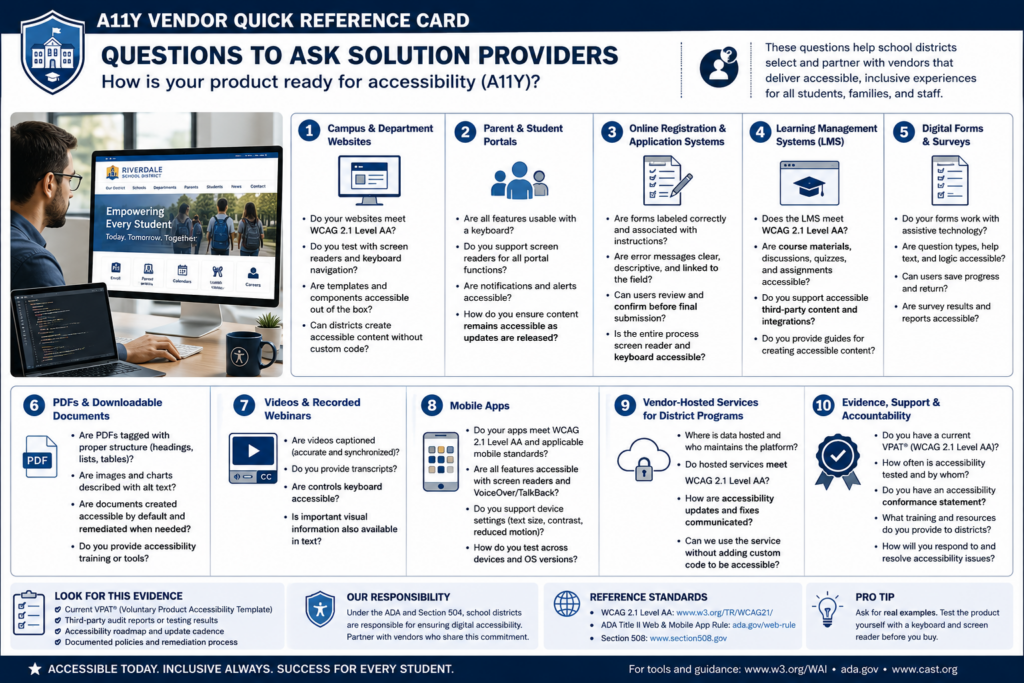
Simply put, a vendor resource does not get a pass just because it sits behind a login or belongs to a vendor. The Department of Justice fact sheet points out that content and apps delivered through contracts, licensing, or other arrangements are covered right along with everything you build yourself.
When Do Schools Need to Comply?
The Department of Justice extended the original compliance dates in April 2026. Public entities serving a population of 50,000 or more now have to meet the technical requirements by April 26, 2027, while smaller public entities and special district governments have until April 26, 2028. Both dates appear in the 2026 interim final rule.
One trap is worth naming early: population means the jurisdiction you serve, not your student enrollment. The DOJ walks schools through that distinction in First Steps Toward Compliance. Some school districts confuse jurisdiction with student enrollment. That could be a big mistake.
Here’s why it matters:
The population figure determines which ADA Title II compliance deadline applies. A district might enroll only 8,000 students but serve a jurisdiction with more than 50,000 residents. Using enrollment would wrongly place that district in the smaller-entity category and could make it plan around the later deadline.
Public entities already carry ADA duties around effective communication and equal access, and those duties did not move with the deadline. A family can raise a barrier today, and courts have recognized web accessibility claims for years.
Start With What Families Actually Have to Do
Start with the essential tasks a family or staff member has to complete:
- Enroll a student
- Apply for a job
- Submit a required form
- Find emergency information
- Get into a course
- Read a board document
- Ask for help
Work through each one using a keyboard alone, no mouse, then run the same pages through a screen reader and zoom to 400 percent to see what falls apart. From there, make sure to check the following:
- Forms,
- Videos,
- PDFs, and
- Error messages inside tasks
When you find an issue, fix it in the shared template or component rather than page by page. That is how you keep the same problem from quietly reappearing across hundreds of pages you have not even opened yet.
Who Owns This?
As you may have guessed, your web developer isn’t the sole person responsible for this. While you may wear that hat in your role, this is actually a A11Y is everyone’s responsibility. Consider that Communications manages pages, teachers upload documents, human resources posts job applications, curriculum staff build courses, and vendors run the biggest platforms. Wherever people publish, that’s where the responsibility has to be assigned as well. It’s a big job, especially if you outsource solutions like learning management systems, content management systems, video hosting, parent/student portals.
You will need to put a system in place to manage all the components, including a content inventory, a named accessibility owner, staff training, purchasing requirements that ask vendors to prove conformance. You will also need a clear way for people to report barriers, and a written remediation plan. I would also recommend a committee to share the compliance load. Here’s a list of questions you can use:
The point is not to earn an “A11Y certified” badge. No automated checker can hand you one honestly. The point is that a person with a disability can reach the same information and finish the same school tasks with comparable privacy, independence, and ease.
| Focus | What to do first |
|---|---|
| Essential tasks | Test enrollment, job applications, and forms by keyboard and screen reader |
| Shared templates | Fix the component, not the individual page |
| Documents | Replace image-only PDFs with readable, tagged versions |
| Purchasing | Require vendors to document WCAG 2.1 AA conformance |
| Ownership | Name an accessibility lead and train the people who publish |
Not only is A11Y a legal requirement, it is also a long-term goal that schools and districts need work towards achieving and maintaining.
A Tool to Help: Digital Accessibility Readiness Assessment
Consider using this Digital Accessibility Readiness Assessment to assist you in getting ahead of the deadlines.
But Wait, There’s More
Do you have access to a paid chatbot, such as ChatGPT, Claude, or Gemini? Get it to do the initial, first-step work of assessing your websites and other services. Use these custom instructions (get a copy) and paste them into your chatbot of choice. Then, ask it to assess the website or learning management system. It won’t be perfect, but it may get you further along than simply eyeballing a website.
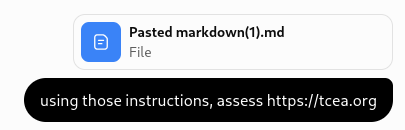
For fun, I used ChatGPT to assess the TCEA.org website using the custom instructions…you can see my prompt was short and to the point. This process took about
Wondering how to use the instructions? Copy-n-paste them into a chatbot screen. You might even create a custom Project (Claude and ChatGPT call them “Projects,” while Gemini may refer to it as a “Gemini Notebook and Gem”) if you know this is something that you’ll be doing again and again. You can also use a tool like BoodleBox ($20 a month) to create a bot (MGFREE123 gets you a month or two for free of the pro level account).
After it’s completed the assessment, it will give you a report that looks similar to this:
Wouldn’t it be nice to have a report like this available to kick your A11Y committee work off?
Pick one high-traffic task on your site this week, the enrollment form is a good candidate, and try to finish it using only your keyboard. What you run into will tell you exactly where to start. Share what you learn in the comments.