
The short version
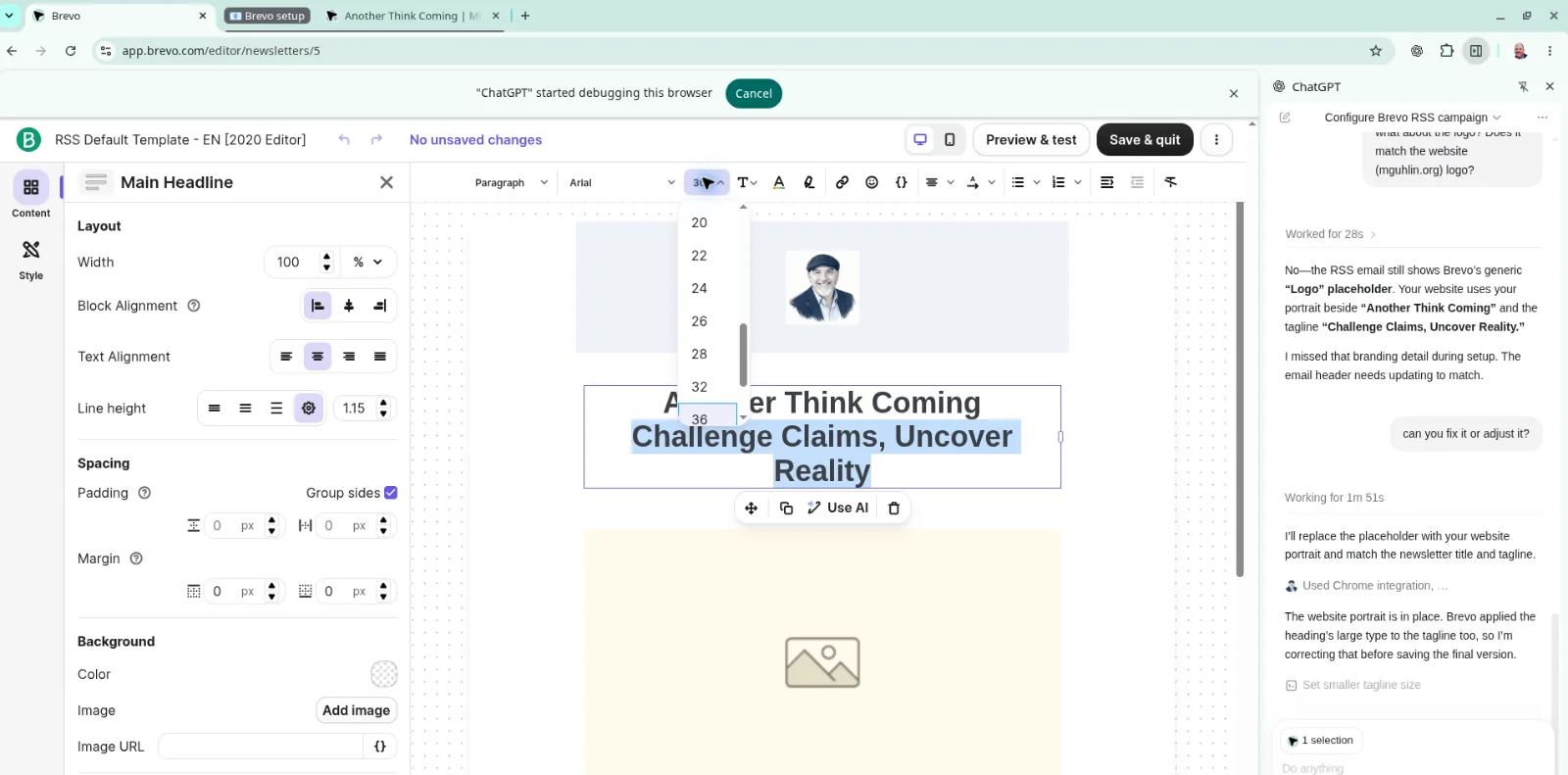
Since this blog engine is vibe-coded, it lacks email subscription and commenting. That's why watching Chat's computer use design and configure my Brevo account for email digest emails is mind-blowing.
Imagine having to configure a complex series of steps, editing and customizing HTML in a system you’ve never used before. That’s the challenge that ChatGPT’s computer use enabled me to avoid. I could feel the sighs starting up inside me, that feeling of frustration of having to learn something new while trying to finish a task and get back to something else. You know, packing too much new learning into a short time with little investment in the learning. I’ve done this countless times when working with new technology. Doing it again seems like so much useless suffering.
Computer Use Agent - Your Magic Assistant
Of course, relying on ChatGPT or Claude (it can do this, too) to do things for you isn’t magic. But it’s pretty close to it, as you watch a more knowledgeable assistant help you get something complex done. And, if you’ve never had to set up a brand new system before (no offense to Brevo.com, which offers a free tier), then having ChatGPT’s Chrome extension do the hard work is quite unbelievable.
When a chatbot takes over your browser or screen, it’s called “computer use” or “computer-using agent” capability. This is an emerging AI feature that lets chatbots interact with graphical user interfaces (GUIs) just like humans do. These AI agents can: “See” your screen through screenshots; “Act” by clicking buttons, typing text, scrolling, and navigating; Complete tasks autonomously like filling forms, booking appointments, browsing websites, or using desktop applications. “Computer use” transforms chatbots from text responders into autonomous agents that can actually interact with your software interface. It’s promising but still emerging technology with ongoing safety refinement.
To get email subscription set up for MGuhlin.org, I relied on ChatGPT’s computer use agent. What would have taken me hours, done in 20 minutes. I’ve also successfully used Claude’s computer use agent via Chrome to download endless number of files from a website. Again, it would have taken a long time to download the files, given the website’s propensity for click here, then there, then back over here approach to managing items. The computer use agent learned the process from watching me do it, then proceeded to get it all done.
Subscribe to MGuhlin.org
If you’d like to subscribe, use the Subscribe by email Free updates from Another Think Coming link. And, consider giving a computer use agent access in your Chrome browser to get it to do something that would otherwise be long, tedious, and a pain. There’s a time and place for learning new things, but this kind of one-off seems a bit of a waste of time.