
Convert OGV to WebM #ubuntu #lubuntu
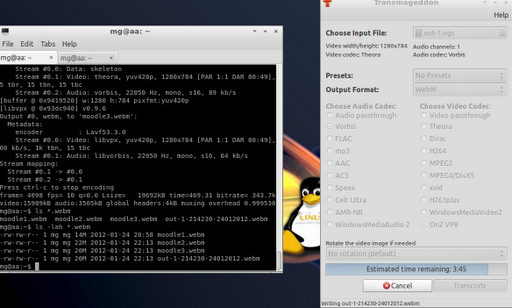
Converting via command line on left side, using Transmaggedon on the right.
Earlier tonight I made some recordings (of Moodle 2.2 setup) using the gtkDesktopRecorder, which works great. However, since I’d be sharing these videos with a colleague, I needed to convert them to WebM format on my LubuntuLinux (very lazy, don’t want to reboot to Windows to use FormatFactory).
My first video, I converted using Transmaggedon, which works quite well, but…took forever (25 minutes for a 50 meg video) and I could only convert one at a time. So I started looking for a different approach and found this one by Paul Rouget.
Using the Terminal, I was able to type in the following command on multiple tabs and get simultaneous conversions going…the video input/output files are in bold:
Try #1 - Failed!
ffmpeg -i out-1.ogv moodle2.webm
The command line was a lot faster, unfortunately the quality stunk! So, then I tried the following (from Paul’s site):
Try #2 - Failed!
ffmpeg -i out-1.ogv -acodec libvorbis -ac 2 -ab 96k -ar 44100 -b 345k -s 640x360 moodle2.webm
But the quality stunk on that one, too. Sigh.
Try #3 - Failed!
ffmpeg -i out.ogv -f webm -sameq out.webm
Not knowing what the right settings are for ffmpeg, I’ll have to keep using Transmaggedon (sudo apt-get install transmaggedon), which has been working great on the conversions to WebM (albeit one at a time and slow).
For fun, here’s the original OGV file (99.4 megs) and the converted WebM file (21.8 megs). You have to like the smaller size! And, no, I didn’t script this at all. It’s a rough-n-ready video for a colleague.
Get Blog Updates via Email!
Enter your email address:
Delivered by FeedBurner

 Subscribe to Around the Corner-MGuhlin.org

Visit the Texas for Technology Enhanced Education
Everything posted on Miguel Guhlin’s blogs/wikis are his personal opinion and do not necessarily represent the views of his employer(s) or its clients. Read Full Disclosure