
El Paso ISD Shares #iPad Implementation Notes
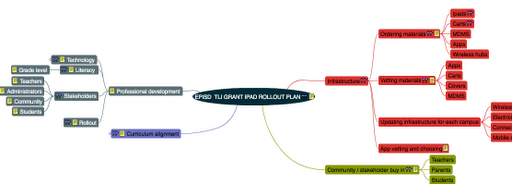
View interactive version online | Have Freemind? Get the MM document file
Special thanks to Tim Holt (El Paso ISD Director of Technology) for sharing his iPad implementation graphic organizer (Get the free, open source Freemind software that will work on Windows, Linux, and Mac) and notes. We’ve seen lots of different walkthroughs of how an implementation should happen.
NOTE: Since Tim was kind enough to send me the original file, if you still allow Java to run on your computer, you should check out the web-based version of the graphic organizer. I’ve uploaded it to a colleague’s server…it’s interactive.
Here are some other neat iPad implementation links that I’ve found helpful:
-
Preparing Your School for an ipad Implementation - This is the best I’ve seen on the subject. - http://goo.gl/skCAU
-
iPad Dos and Don’ts - http://goo.gl/slTMN
-
THE Journal’s Primer on iPad Implementation - What’s neat about this article is that it makes the following assertions,
Schools desiring to implement an iPad 1-to-1 program must consider the personnel available within the organization. It is our experience that launching an iPad program requires a champion with sufficient positional power to command the attention of all constituents within the school community, including the head of school, faculty, IT staff, parents, students, and community leaders.Based on our experiences, successful schools will have a senior administrative leader driving this initiative.
and
The total cost of an iPad 1-to-1 launch is greater than the cost of the device. Schools will need to consider cases, applications (apps), network improvements, security measures, and other related costs. It is our experience that an iPad 1-to-1 program will not, and cannot, be sold to constituents as a cost-saving initiative.
andSchools must ensure that their network is prepared for hundreds of wireless devices.
- Is the wireless network robust?
- Has the school purchased enough bandwidth?
- Will students utilize school servers or the cloud for document storage?
- Are your servers able to host support software for your program?
-
Finally, it’s critical to evaluate your iPad implementation…this link on 5 Reasons to Evaluate Your School iPad program is worth reading if only to get the idea across.
SHARE YOUR FEEDBACK ON IMPORTANT QUESTIONS
Of course, I encourage you to share more of your critical iPad implementation relevant questions via this GoogleDoc anyone can edit!
TIM’S NOTES
Below are Tim’s Notes, although I encourage you to view this as a graphic image since it is interactive via this web page:
-
EPISD TLI GRANT IPAD ROLLOUT PLAN
Start:Apr 3, 2012
Progress:0%This is a basic overall roll out plan for the EPISD TLI Grant . Including the four areas that we are rolling out.
-
Infrastructure
Start:Apr 3, 2012
Due:Jul 31, 2012
Progress:0%
Resources:Instructional Technology,Jessica Herrera -
Ordering materials
Resources:Instructional Technology,Jessica Herrera,Literacy coaches,Tim HoltNeed to coordinate the ordering of the technology so that rollout matches the timeline of the grant. There are specific venal times, and there are general deadlines such as “iPads will be on campus at the beginning of the school year.”
-
Ipads
Resources:Matt Cooper,Tim Holt -
Carts
Resources:Tim Holt -
MDMS
-
Apps
-
Wireless hubs
-
Vetting materials
Resources:Instructional Technology,Literacy coaches,Sandra Garza,Teachers,Tim HoltThere are many materials that are part of the technical part of the grant that are not part of the EPISD inventory. For instance,iPad carts or sync stations. iPad covers that protect the devices. Apps are also a major part of the vetting process.
-
Apps
-
Carts
-
Covers
-
MDMS
-
Updating infrastructure for each campus
-
Wireless
This makes sure that each campus has the required wireless networking capability. Most campuses will need to update the number of wireless hubs in the hallways that the -
Electricity
-
Connectivity
-
Mobile device management software
-
App vetting and choosing
Each app must be vetted by teachers at the grade level . The apps are -
Community / stakeholder buy in
Resources:Campus administrators,Literacy coaches,PTAThe community needs to be informed in how the devices will be used in the classroom.
-
Teachers
-
Parents
-
Students
-
Curriculum alignment
Resources:Curriculum and Instruction,Instructional TechnologyThe technology needs to be aligned to the episd standards based curriculum. This includes the alignment of the apps to the curriculum and finding apps that do not simply replicate what. Already do in class.
-
Early childhood
-
Kinder -2
-
3-5
-
6-8
-
9-12
-
Professional development
There are several professional development stakeholders that need to be addressed. Admins,teachers, students and community members. -
Technology
Resources:Curriculum and Instruction,Instructional Technology,Staff DevelopmentThe technology training aspect is based on the SAMR MODEL and the iPad basics model of atomic learning.
-
iPad basics
Resources:Atomic Learning,Instructional Technology -
Apps
Resources:Curriculum and Instruction,Instructional TechnologyApps are based on the level. Each level has differ apps
-
Project share Texas
Resources:Instructional TechnologyAll stakeholders need to be in PST
-
Large group
-
Individual site
-
MDMS
Resources:Jessica HerreraNetwork administration is in charge of this
-
SAMR MODEL
Resources:Instructional TechnologyThe SAMR model is designed to demonstrate how to properly integrate technology into class lessons.
-
Administrators
-
Teachers
-
Literacy
Resources:Curriculum and Instruction,Sandra Garza,Texas education agencyThis is the training as prescribed by the grant
-
Grade level
Grade level specific -
Stakeholders
Resources:Campus administrators -
Teachers
Teachers will be trained on how the devices work as well as the new TEKS and the SAMR MODEL of technology integration. -
Administrators
Admins will be trained on SAMR MODEL and what technology integration looks like using the samr model -
Community
Parent and community: can we do video for channel 15.2? -
Students
AUP CYBER SAFETY meets the needs of Erate -
Rollout
Resources:Administrators,Campus administrators,Instructional Technology,Network administration,Staff Development,Technology services,Tim HoltHow do we rollout the materials for the grant? Large group? No training no iPads?
Get Blog Updates via Email!
Enter your email address:
Delivered by FeedBurner

 Subscribe to Around the Corner-MGuhlin.org

Visit the Texas for Technology Enhanced Education
Everything posted on Miguel Guhlin’s blogs/wikis are his personal opinion and do not necessarily represent the views of his employer(s) or its clients. Read Full Disclosure