
Must-Have Windows Software (Updated - 07/2015)
Last Updated: 07/2015
A short time ago, I updated my must-have Macintosh Apps but failed to do the same for my Windows software. The need to do the same for Windows was driven home when a colleague asked me to re-setup her computer after a spyware infestation. Although I tried to bring it back, after an hour and a half of work, the spyware hung tough. At which point, I reformatted.
Although I keep a copy of all this great software on a USB flash drive, I am also finding it extremely convenient to house it in Dropbox.com and then access it via the Web interface when needed. Works like a charm! Definitely an option to keep in mind.
Hey, check this out! Use Ninite for creating a quick, easy to download and install set of programs you can use. Here is a screenshot of my favorite apps available through Ninite. This is free for home use, but if you’re a business/school, you’ll want to spend some money.
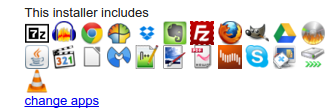
Below is my must-have software list, as well as a few educational software titles that folks thought worthwhile, divided up into two categories:
- Great to Have on Any Windows Computer - These are those programs you shouldn’t have a Windows installation miss. Starred items are intended for home, personal use and aren’t appropriate for K-16 settings.
- Educational Settings like a Computer Lab - These are additional programs that would make great additions to a Windows computer lab machine.
#1 - Great To Have on Any Windows computer
-
Put This On All Your Computers
-
7Zip - Simple, powerful compression/decompression program. Need a GUI? Use PeaZip
-
Chrome browser apps:
-
Screencastify screencasting tool
-
Tweetdeck for Twitter in the cloud
-
AnyVideoConverter Free*- Some folks love this program…it works.
-
Audacity audio editor/player
-
DVD Flick - Burn DVDs from videos on your computer.
-
FileZilla - FTP Client, a necessity if you work with a server.
-
Firefox Internet Browser
-
GreenShot - A simple, easy to use screen capture tool. Free, open source, too.
-
LibreOffice - my favorite alternative to MS Office…in fact, with LibreOffice (replaces OpenOffice), you don’t need MS Office!
-
NotePad++ - need a simple text editor? this is it.
-
Paint.net - Up to date Paint application
-
PDF Creator - allows you to print to PDF from any application for free.
-
PDFSAM - Merge PDFs with this cross-platform java-based tool.
-
Scribus - Desktop publishing software. I’ve used this to create picture calendars…great!
-
TeraCopy - Copy/move files quickly. Much faster than relying on built-in Windows explorer to make the copies, especially to external USB drives.
-
THE GIMP - image editing tool
-
Universal USB Installer - from PenLinux, allows you to burn ISO images of GNU/Linux to USB. Works great, even better than Unetbootin.
-
Virtual Dub - Video/audio capture software…let’s you record what you’re watching/playing on your computer.
-
VLC Media Player - plays just about everything video and/or audio
-
WinFF - video and audio conversion tool
-
*Software That’s Nice to Have But is For PERSONAL, HOME USE ONLY as determined by License or Appropriateness
-
License Restriction
-
Malware Bytes* - Great to use when you think your computer has been infected with malware/spyware and you need your computer “cleaned out.”
-
Spyware Blaster*- An easy to use “innoculation” program against spyware/malware.
-
Spybot Search and Destroy* - Best part of Spybot is the TeaTimer which protects your computer’s registry against contamination and immunizes your browsers (IE,Firefox) against malware.
-
Not Appropriate for Computer Lab or School Use
-
AVG AntiVirus* - A nice antivirus program.
-
BleachBit - Keep your machine clean of junk and free space wiped for security purposes. Also handles a lot more to keep your machine safe.
-
CCleaner - Use CCleaner to securely erase your temporary Internet files, clean up your registry.
-
Skype - great app to connect with other folks
-
Virtual CloneDrive - a must-have for netbook users…it allows you to mount ISO (CD images) without a CD drive. This enables you to download ISOs of CD images—or make your own on another computer that has a CD drive—then mount it on your computer as a virtual drive.
-
Virtual Box - lets you add other operating systems and run them without interfering with your Windows installation.
-
uTorrent - Lots of information is shared via Torrent file. It’s nice to have one handy that works well.
-
Xvid video codecs
-
My Favorite Security Software
-
Secure Space Encryptor (SSE) - Encrypt files and folders with AES-256 encryption. Works great and is available for Mac, Windows, Linux, and Android.
-
Paranoia Text Encryptor (PTE) - Encrypt text messages, email, and other text documents. Available for Mac, iOS, Windows, Linux, and Android.
-
Keepass Password Manager - Keep track of your passwords, as well as generate high-quality ones. Works on Mac, Windows, Linux, Android, and iOS.
-
File Shredder - Securely shred individual files or folders. You can skip this app if you install AVG AntiVirus, which comes with a shred utility.
-
Veracrypt Drive Encryption - Create an encrypted “hard drive” container.
#2 - Educational Settings (e.g. Computer Lab)
-
Productivity
-
GoogleApps for Education
-
LibreOffice
-
Cmap Tools - Graphic organizer software.
-
Google Sketchup - “easy to learn 3D modeling” program.
-
Programming
-
Alice.org - Learn 3D Object Oriented Programming
-
Scratch - program making software from MIT.
-
Miscellaneous Titles
-
SchoolForge collection of educational software
-
Stellarium - free planetarium
-
Celestia - free space simulation
-
Graph - make graphs of different mathematical functions in a coordinate system.
-
TuxMath - save the world by solving math problems
-
Tux Typing - easy typing program for kids…perhaps, too much fun?
 Subscribe to Around the Corner-MGuhlin.org
Everything posted on Miguel Guhlin’s blogs/wikis are his personal opinion and do not necessarily represent the views of his employer(s) or its clients. Read Full Disclosure