
MyNotes: Better Systems Management with VMware #tceasysadmin
A presentation by Bobby Robertson (Bryan ISD) at the TCEA System Admin 2015.
MyNotes
-
About 16K students, 2000 adults, 14000 user devices
-
Not an expert on VMware but using it for several years.
-
Today’s Topics
-
Virtualization benefits
-
what’s new in vsphere 6
-
how bryan isd utilizes vmware
-
10gb everything
-
disaster recovery
-
operations management with vRealize
-
Virtualization Benefits
-
Reduce footprint
-
Reduce cost
-
Improve uptime
-
Increase hardware lifespan
-
Decrease tickets
-
Maximize performance
-
What’s new in VSphere 6
-
Fault tolerance - up to 4 vCPUs and 64GB RAM
-
VMotion across slow/long distances
-
Faster, more responsive web client
-
NVIDIA GRID vGPU Support
-
Virtual volumes
-
NFS 4.1 support
-
Storage IOPS reservations
-
Improved vCenter Appliance
-
Virtualization in Bryan ISD
-
Main Cluster Setup
-
100+ virtual servers
-
VSphere 6.0 Update 1
-
8 Hosts - 7 Enterprise Plus, 1 Standard
-
2 SANS - 1 hybrid array, 1 cheap-n-deep
-
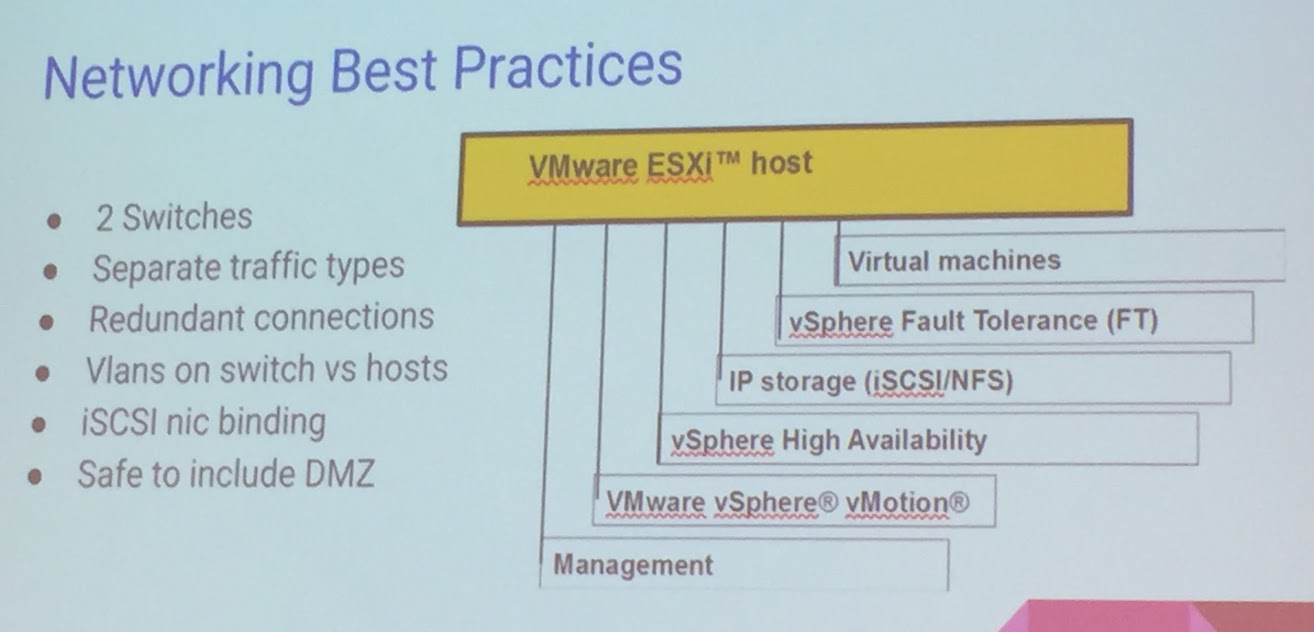
2 Meraki MS420-48 10gb top of rack switches - redundancy is important that’s why I’m using 2 switches.
-
80+ Direct attach 10gb cables
-
6 additional hosts
-
1 standard, 5 free ESXi
-
Reduced Footprint
-
80 old servers taking up 140U - 5 racks of hardware - Now Gone!
-
No longer need UPSs, ToR switches, complex KVM switches
-
Only 11 physical, non-ESXi servers
-
Cost Savings We’ve Seen
-
80 servers is a lot to keep up with.
-
Save on equipment
-
over 80 servers replaced with vms or P2Ved
-
Reduction in UPS maintenance
-
$25K in new servers & VMware licensing a year, instead of $50K in new servers
-
Save on OS licensing
-
Easily try a linux solution before Windows
-
Windows standard covers 2 virtual running instances
-
Save on power and cooling
-
80 servers at avg of 2000 BTU/Hr = 160,000 BTU/hr
-
$10K saved in power a year
-
$16K saved in cooling a year
-
No more idle servers
-
Improved Uptime
-
Things that don’t bring my vms down
-
VMware upgrades and patches
-
SAN/storage upgrades or migrations
-
Server maintenance/replacement
-
Switch failure/upgrades
-
Hardware failures
-
10gb upgrade
-
Testing is done on snapshots/clones
-
Centralization means few panes of glass
-
No more driving to work at 4AM
-
Improved Hardware Lifespan
-
Main cluster hosts are rotated every 4-5 years
-
Retired hosts?
-
Never
-
The Trickle Down
-
Cycled out Hosts are moved to secondary locations
-
High School Hosts (2-5 vms)
-
1 to 1 CCTV servers
-
Racked at DR site
-
Decrease Helpdesk Tickets
-
get ahead and stay proactive
-
alerts detect problems before users
-
self correcting actions like high availability
-
reosurce utilziation with DRS
-
Fix what isn’t broken
-
No more Helpdesk tickets!
-
Moving to 10gb
-
Between Sites
-
distributed data center
-
fast backups, replications
-
fast vMotions - 8vms at once with 10gb vs only 4 with 1gbs
-
SAN/NAS
-
makes replication/backups faster
-
4x 1gb may not cut it
-
Hosts
-
SPlit a couple 10gb connections using distr switches
-
Disaster Recovery Planned
-
Non-critical 1 to 1 servers can be moved to DR site (New cluster assembled out of the old)
-
Storage array replications to dr site
-
replicated data stores are easily attached to DR cluster
-
VMWare Site Recovery Manager
-
Automated Orchestration and testing of DR
-
VMware vCloud Air Diaster Recovery
-
Recovery as a service
-
vRealize What’s Going On
-
Easy to setup demo
-
More than vSphere alerts
-
Highlights problems, future problems, and performance issues
-
More Savings
-
Increase capacity utilization
-
Increase consolidation ratios
-
Increase hardware savings
-
reduce diagnostics & problem resolution time
-
Resources for You
-
VMware community forums
-
VMUG - Groups of users and not salespeople
-
IRC chat on Freenode #vmware
-
Regional VMware engineers
Everything posted on Miguel Guhlin’s blogs/wikis are his personal opinion and do not necessarily represent the views of his employer(s) or its clients. Read Full Disclosure