Welcome to my resources page for my sessions at TCEA 2026 AI Conference. You’ll find everything (slides, supporting documents, infographics) below. Questions? Don’t hesitate to reach out.
Create AI-powered Publications and Dashboards
1094-AI as Your Instructional Design Partner

Date and Time: Tuesday, June 9, 2026, 9 a.m. - 9:45 a.m. (CDT)
Most AI-assisted professional learning design stops at asking a chatbot to generate a workshop outline. This session goes further. Participants will explore how to use AI as a genuine instructional design partner, building sessions grounded in the ALDO framework, differentiating for role (teacher, coach, instructional leader), and evaluating AI-generated drafts against Hattie’s Visible Learning research and SOLO Taxonomy.
Session Resources
- Slides and Doc
- Slide deck
- Google Doc
- Website - AI Design Companion
- BoodleBox Bot - TCEA Strategy Partner (BoodleBox Unlimited Pro account required)
2094-Create AI-powered Publications and Dashboards

Date and Time: Wednesday, June 10, 2026, 11 a.m. - 11:45 a.m. (CDT)
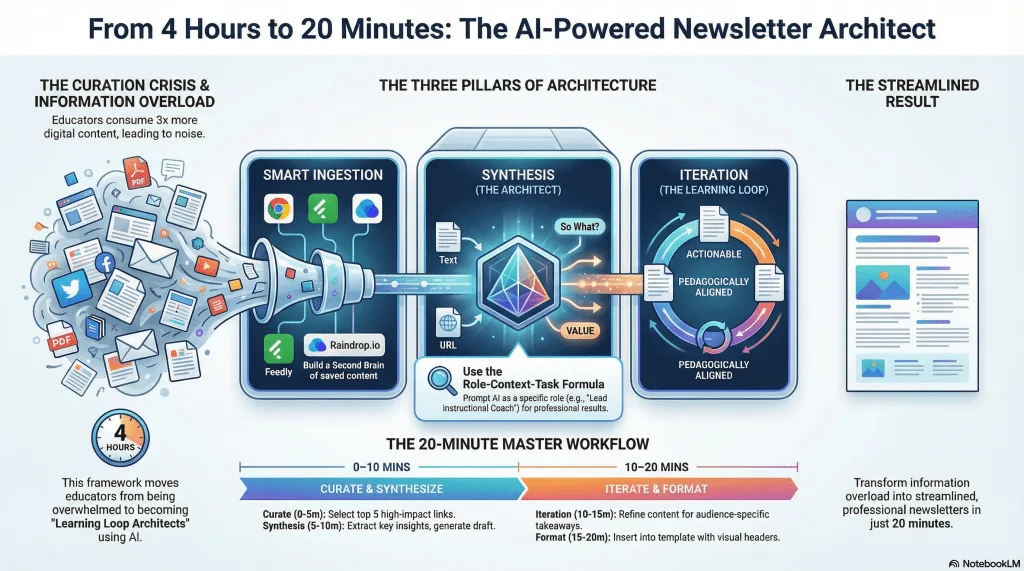
With educators consuming three times more digital content than five years ago, the challenge isn’t finding information. Rather, it is transforming it into meaningful learning experiences. This hands-on workshop addresses teacher workload concerns by teaching participants to become “Learning Loop Architects,” mastering AI-powered workflows that turn chaotic content curation into streamlined, professional digital publications. You will see how to make KPI dashboards, save web-based data into Google Sheets via AI-generated Apps Script, and more.
UPDATE: Copyright question.
In my session, someone asked a question about copyright. At the time, I was more focused on the technical flow and how-to to even ask, “Just because you can, is it legal to do so?” So, I did a little poking around (yeah, I asked Gen AI) and here’s the response as a webdeck:
Newsletter AI Assisted Creation — copyright-safe guidance, rubric, and project instructions for curated educator newsletters.
Open the interactive deck in a new tab ↗
Session Resources
Slides and Doc
- Slide deck with Oreo Personality Quiz blog and quiz
- Google Doc with supplemental documents and Get a Copy of Google Sheet for version 4
- Make Data Displays Without Writing Code, a TCEA TechNotes Companion Blog Entry
- Play iBINGO or access iBINGO Game Maker
KPI Dashboard Related
Newsletter Related
- AI Interactive Newsletter
- Listen to NotebookLM Audio Overview
- Track Your Links: Use free Raindrop.io
- Example Newsletters:
Free Tools (do NOT put in PII, FERPA, Confidential/Sensitive Data):
-
Z.ai (write-up)
Paid Tools
- BoodleBox Unlimited (Use MGFREE123 code for two months free)
- ChatGPT Plus
- Claude AI
- Google Gemini