
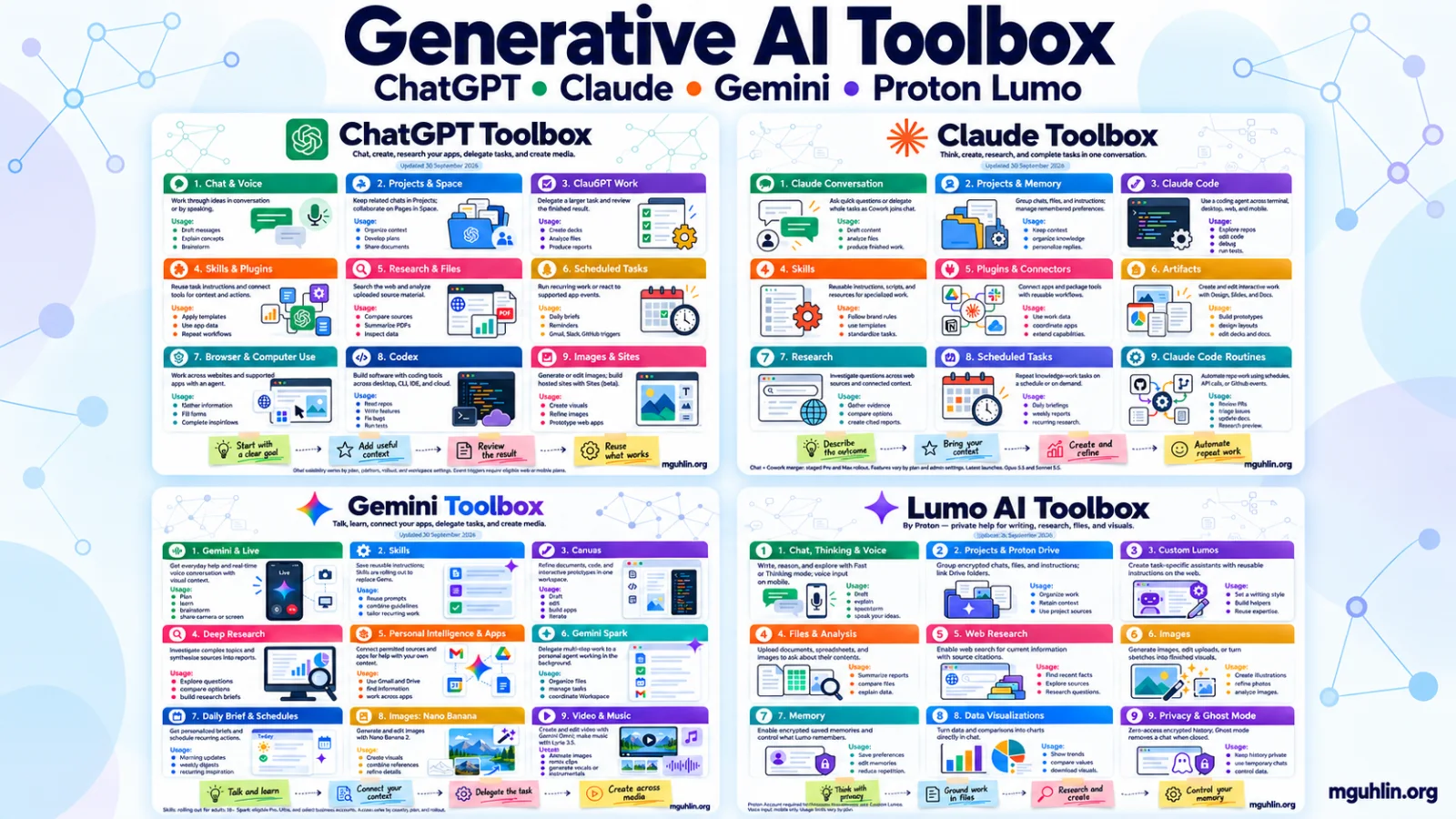
The short version
Looking for an updated toolbox showing the best features of ChatGPT, Claude, Gemini, and Lumo AI? Then this collection of infographics might do it for you.
Tired of Gen AI features changing quickly and not being able to keep up? Sitting at my desk one day, I wanted a quick set of visuals that I could use to compare the features of popular Gen AI tools. That’s what inspired the toolbox infographics, a need to be able to see what was possible. Since I made that first set, I’ve found myself wanting to update them. This week seemed a perfect week to do so given that both OpenAI and Anthropic announced big changes to ChatGPT and Claude. It’s also probably worth mentioning that Gemini has seen changes as well, promising to switch out Gems for Skills in November, 2026.
If you are someone who wants a visual to compare features, then these images may be just what you need. Or they may prompt you to go exploring on your own. When I first shared this with colleagues, they couldn’t get enough of these infographics. The purpose for the quick reference enables one to see what tools are in each Gen AI toolbox. For example, ChatGPT offers Codex, while Claude suggests Code. Both come with Projects. Having a visual to compare the features can be helpful.
For my part, these are quick reference infographics that jog my memory as to what is possible in each tool. Take a moment to look through these infographics, save them or print them for easy access. And, of course, feel free to share them with others.
ChatGPT
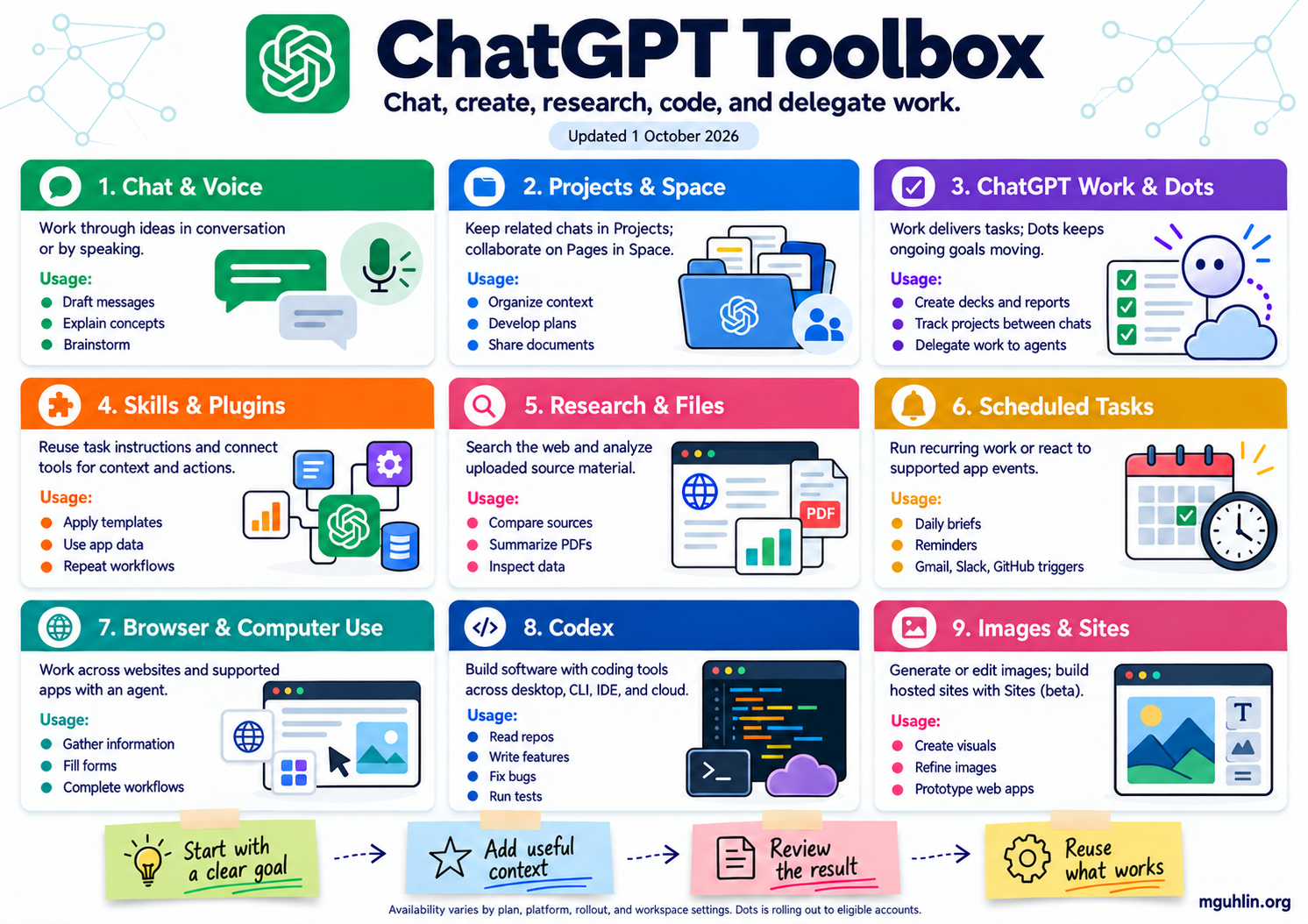
October 1 update: The ChatGPT poster now includes Dots. A new Personal AI Agents Toolbox compares Dots, Grok Bot, Meta Muse, and Gemini Spark, with examples and sentence starters. Select the image above to view the full-resolution original.
| Feature | What it does | Example use |
|---|---|---|
| Dots | An always-on personal agent that follows ongoing responsibilities between conversations using memory, connected tools, and its own cloud computer. It can delegate Work and Codex tasks. Gradual rollout to eligible Pro and business accounts; plan, region, age, and administrator requirements apply. Official guide | Keep a project brief current, track deadlines, and bring decisions back for review. |
| Space / spaces | Space brings pages, files, and shared work together. Individual spaces group related pages by topic or team; they are distinct from your account’s organizational workspace. Official guide | Organize a team’s research, plans, and resources. |
| Pages | Documents you can write and revise with ChatGPT, with child pages and comments for related work and collaboration. Official guide | Maintain a handbook or turn research into a shared briefing. |
| Sites | Create, host, refine, and share websites, web apps, and games from a prompt or compatible project. Sites is in public beta on Plus, Pro, Business, Enterprise, and Edu, with plan limits and administrative controls. Official guide | Build an interactive guide, dashboard, or classroom activity. |
| Plugins and Skills | Plugins package reusable workflows through skills, connected apps, or both. Skills tell ChatGPT how to do a task; apps provide access to external tools and information. Official guide | Apply a publishing workflow using your style guide and connected documents. |
Plugins versus Custom GPTs
A Custom GPT is a configured assistant you open or select, with instructions, knowledge files, and optional actions. A Plugin packages a workflow that you can select in Chat or Work; ChatGPT may also activate a relevant installed skill automatically. Instructions and reference files can become a skill, while apps supply integrations.
Enterprise Custom GPTs are transitioning to Plugins. OpenAI’s migration guidance applies to Enterprise; it does not establish one retirement date for every plan. Custom actions need rebuilding, and migrated behavior and sharing need testing. Migration and comparison guide
Claude
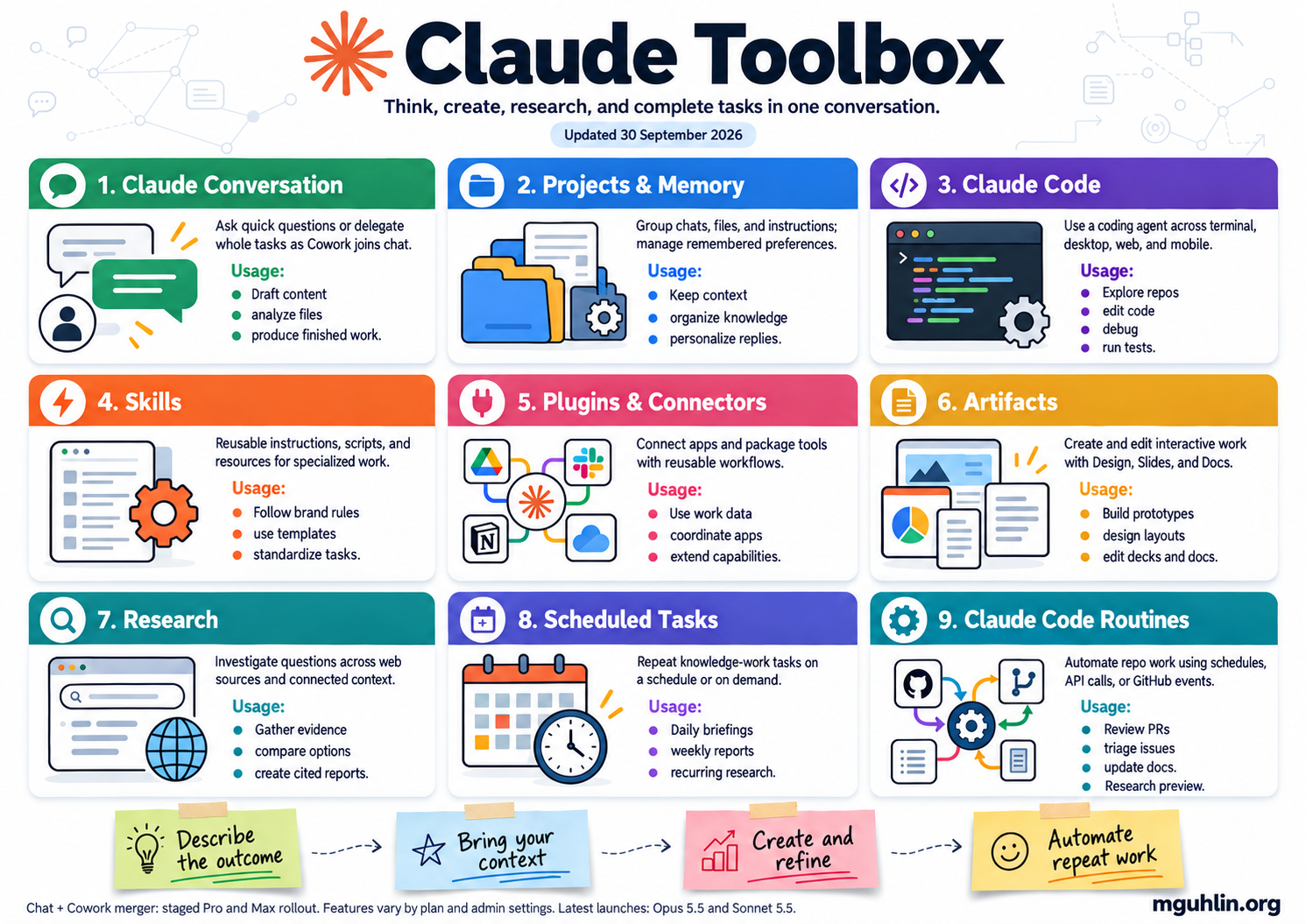
| Feature | What it does | Example use |
|---|---|---|
| Skills | Reusable task instructions that can include examples, reference files, and scripts. Claude loads relevant skills for a task; you can create them with Claude or upload your own. Skills require code execution. Official guide | Reuse your lesson-plan structure, report format, or brand rules. |
| Routines in Claude Code | Save a prompt, repositories, and connectors, then run automatically on a schedule, API call, or GitHub event. Cloud routines keep running with your laptop closed. Available in research preview on Pro, Max, Team, and Enterprise. Official guide | Review pull requests or check documentation for outdated references. |
| Scheduled tasks | Repeat knowledge-work tasks using connected tools, skills, and plugins. These run remotely and are available on paid plans; they are separate from Claude Code Routines. Official guide | Produce a weekly briefing or recurring research report. |
| Claude Design | Create visual designs, prototypes, and one-pagers; refine through chat, comments, and canvas edits. Use a design system and hand work to Claude Code. Beta on paid plans. Official guide | Prototype an onboarding flow or design a visual project summary. |
| Claude Docs and Slides | Create editable, shareable documents and presentations inside conversations. Docs, Slides, and Design are in beta on paid plans; Enterprise administrators control enablement. Announcement | Turn a report into an editable document and presentation. |
| Plugins and Connectors | Connectors link services; plugins bundle connectors and skills into reusable workflows for a role or team. Official guide | Combine research sources with your team’s reporting process. |
Recent change: Anthropic announced the merger of Cowork and chat on September 16, 2026. The unified experience is rolling out to Pro and Max first, with other plans following, so some users still see separate Chat and Cowork options. Announcement
Gemini
I’ve been a bit disapointed with Gemini. While it obviously hit a home run with Notebooks, overall, it remains a clunky afterthought (even though we know it’s not and those Google engineers have been working hard) or appears as an afterthought. True integration is a tough job. Ask Microsoft if you need another all-in-one toolset that’s having trouble figuring out how to blend Gen AI power tools into its suite.
I’m sure they will eventually get it…the same way Apple will get Siri working the way we hope. For now, I continue to be disappointed with Google’s Gen AI efforts. I bought a Samsung phone hoping I could see Gemini be the perfect helper. Instead, I’m stuck with Samsung’s Bixby (which is a slightly dumber Siri) unless I switch over to ChatGPT (which I often do, if I’m not using Lumo AI (more on Lumo below)).
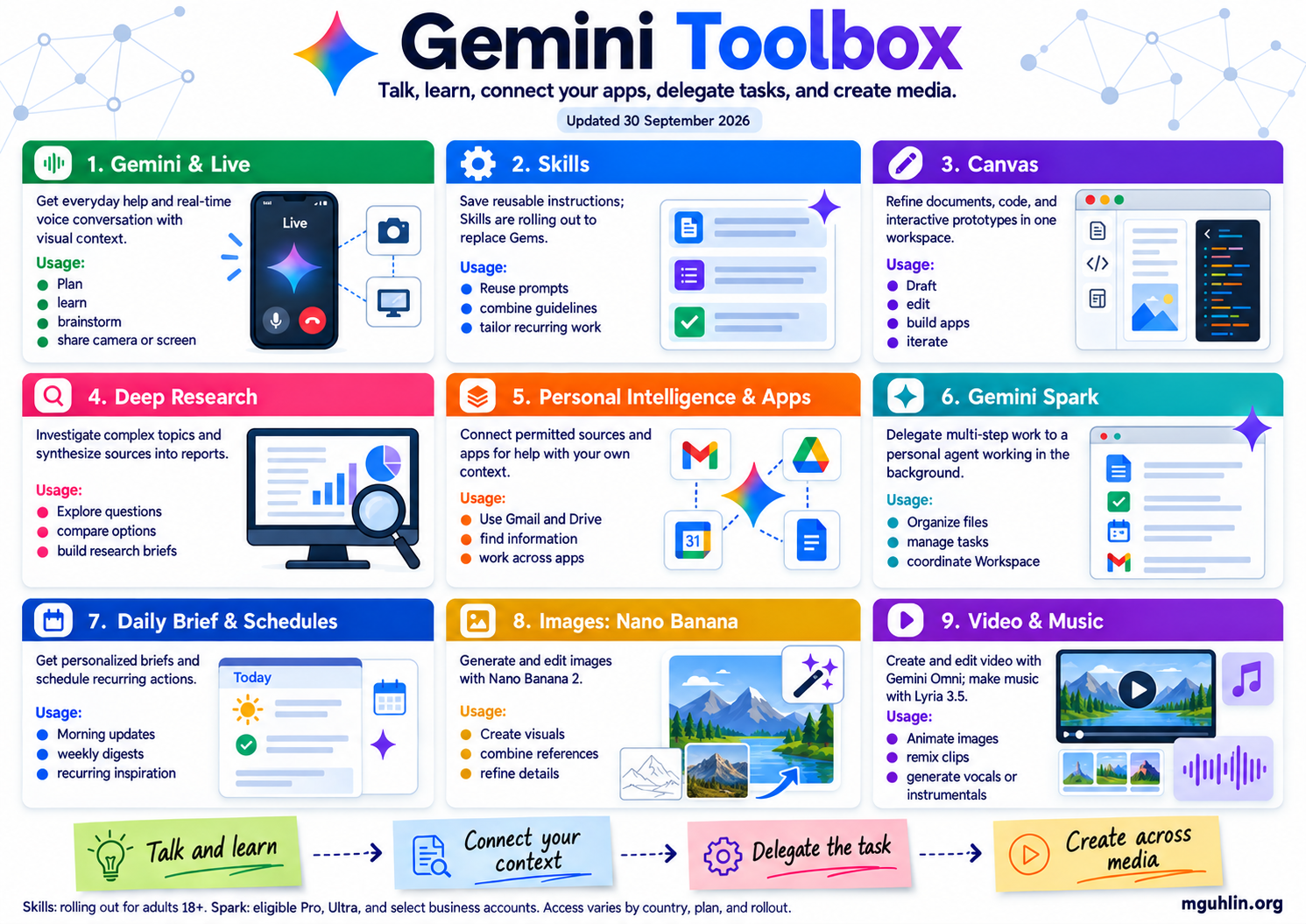
| Feature | What it does | Example use |
|---|---|---|
| Skills replacing Gems | Save reusable instructions, build skills from chats, and combine multiple skills. Gemini can apply relevant skills automatically. Rolling out to adults 18+; Google plans to migrate Gems when they are replaced. Release notes | Combine your writing style with a lesson-plan template. |
| Gemini Live | Switch between typing and voice conversation, with camera or screen context to help explain what you are seeing. Official guide | Talk through a diagram or brainstorm aloud. |
| Canvas | Draft and edit documents and code, build working prototypes, and turn research into interactive quizzes, pages, or infographics. Official guide | Build an interactive study guide from a report. |
| Deep Research | Plan and investigate a question across web sources, uploaded files, and selected Workspace content, then synthesize a report. Official guide | Compare approaches using your readings and web research. |
| Personal Intelligence | Use context from selected Google apps, such as Gmail, Photos, Search, and YouTube, plus preferences and past chats. You control connected sources and personalization. Official guide | Get project suggestions informed by your own context. |
| Gemini Spark | Delegate multi-step work to a personal agent, including file organization and workflows across Google Workspace. Access includes eligible Google AI Pro and Ultra subscribers and select business users, with age and country restrictions. Official guide | Organize project files and prepare documents. |
| Daily Brief and scheduled actions | Daily Brief summarizes priorities from enabled Personal Intelligence sources. Scheduled actions run recurring prompts; eligibility and setup vary. Daily Brief guide · Scheduling guide | Receive a morning overview or recurring topic digest. |
| Images: Nano Banana 2 | Generate images, edit photos, combine references, and refine details through prompts. Official guide | Create and revise a blog feature illustration. |
| Video and music | Gemini Omni generates and edits videos from text, images, and video. Lyria creates music from prompts. Access and usage limits vary by feature and plan. Video guide · Music guide | Animate a visual or create music for a project. |
I honestly wish I had a use for many of the tools Gemini includes, but…meh. Terrible, right?
Lumo AI
Lumo’s not an honorable mention, but rather a tool to put on your radar. It’s one I’ve started using for quick work. It feels like an early version of the more mature tools, however, it has a few of its own features that you may like. The main one I like is privacy.
While most Gen AI consumer tools (e.g. Claude, ChatGPT, Gemini) offer more depth, Lumo AI tries hard and, often, gets the job done. I’m still using the free version or the one that comes with my Proton account. It’s good enough, and keeps me from using tools like Z.ai or Mistral when I need a quick buddy Gen AI to answer, “What’s [actor’s name] net income?” so I can sound knowledgeable when arguing while watching television.
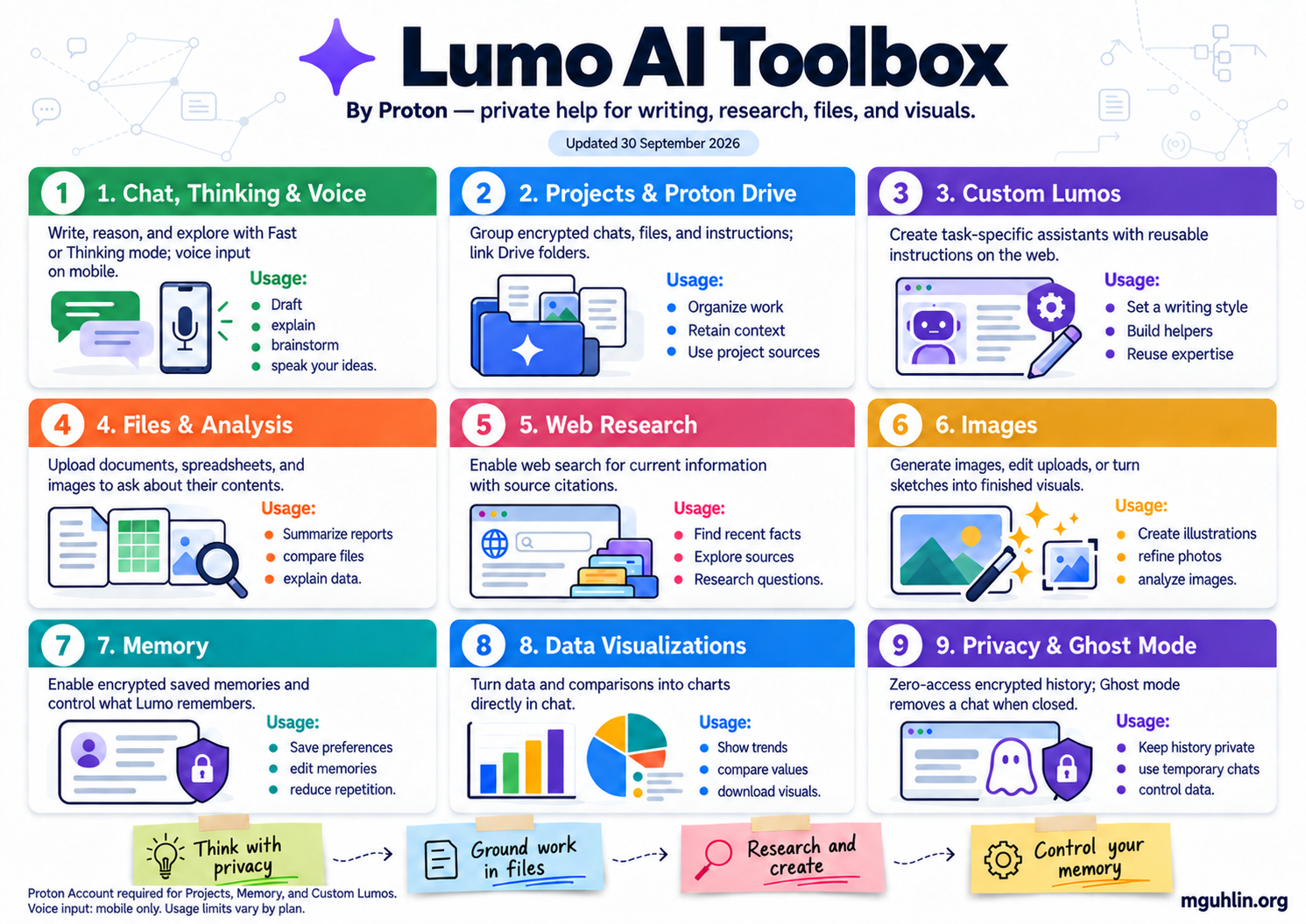
| Feature | What it does | Example use |
|---|---|---|
| Models and reasoning modes | Choose Lumo 2.0 Lite, Lumo 2.0 Max, or Apertus 1.5. Fast mode favors speed; Thinking mode spends more time on analysis. Usage limits vary by plan. Official guide | Draft quickly or work through a complex question. |
| Projects and Proton Drive | Group encrypted chats, files, and instructions; link Drive folders as project sources. Requires a Proton Account; free accounts get one Project. Official guide | Keep course materials, drafts, and writing instructions together. |
| Custom Lumos | Create assistants with a defined role, reusable instructions, and conversation starters. Available on free and paid plans with a Proton Account, on the web app. Official guide | Build a writing helper that consistently follows your style. |
| Memory | Enable encrypted saved memories for preferences and recurring context. Add, edit, or delete memories and control automatic updates. Available on free and paid plans with a Proton Account. Official guide | Reuse your preferred tone and response format across chats. |
| Web search | Optionally include current web information in answers. Official guide | Research recent developments alongside your project files. |
| Images and file analysis | Generate and edit images, develop sketches, or analyze uploaded images and documents in a conversation. Available on web and mobile. Official guide | Create a blog illustration or summarize a document. |
| Data visualizations | Turn uploaded spreadsheets or text-based data questions into charts within chat, refine them, and download the result. Official guide | Compare survey results or visualize a trend. |